Fabricator and Processor: unlock stations and make your first ingots
Quick answer
Build a Fabricator inside your powered base with the Habitat Builder. Then scan the Processor at the Old Habitat and build one at home. Select its recipe and load the ingredients to start processing.
“How to Get a Fully Functional Fabricator in Subnautica 2” by MonkeyKingHero · May 14, 2026 · Early Access launch window (uploaded 2026-05-14); predates the Adaptive Measures and Buddy System updates
Habitat Builder, a charged Scanner and a powered base with interior space.
Bring oxygen support and return supplies for the Old Habitat scan. Directions are approximate published landmarks.
1
Fix the fully functional Fabricator message
The Lifepod’s built-in Fabricator has a limited recipe set. Constructing a base Fabricator provides the full station; scanned equipment still needs its own blueprint.
Unlock the Habitat Builder and construct a sealed, powered base using the building guide.
Open Interior Facilities in the Builder menu, choose Fabricator under Production, and place it on an interior wall.
Complete construction with 1 Titanium, 1 Copper and 1 Quartz, then interact with the new unit.
Older footage · checked Oct 25, 2026 · before Subnautica 2 Early Access 1.2 (Buddy System, August 19, 2026)
On screen: Inside a small round base room at about 12 m, a Fabricator sits on the interior wall beside a window; the diver turns to it and its FABRICATOR menu opens with the category icons down the side.
Check the guide’s version notes before following older footage.
“How to Get a Fully Functional Fabricator in Subnautica 2” by MonkeyKingHero · May 14, 2026 · Early Access launch window (uploaded 2026-05-14); predates the Adaptive Measures and Buddy System updates
The Sonic Resonator guide also uses these ruins. Collect its scans while you are here only if your supplies allow.
Follow Quaker’s black-box signal to the Old Habitat if available. Published routes place these ruins roughly 350–400 m north of the Lifepod; use the buildings to correct your bearing.
GameWith describes dropping through the main entrance room’s floor opening, then entering the nearby ladder room. Scan the Processor in its far-left corner.
Older footage · checked Oct 25, 2026 · before Subnautica 2 Early Access 1.2 (Buddy System, August 19, 2026)
On screen: In a dark habitat room at about 88 m the diver scans a large boxy machine outlined in blue; a PROCESSOR notice then appears at the left as the diver swims up past the room's pipes.
Check the guide’s version notes before following older footage.
“Subnautica 2 How to Get Titanium Ingot. How to Make Ingots and How to Craft Ingots” by Ape Knight Gaming · May 15, 2026 · Early Access launch window (uploaded 2026-05-15); predates the Adaptive Measures and Buddy System updates
Use the Habitat Builder’s Interior Facilities menu to place the Processor inside your base. Prepare its components at the Fabricator first. These costs cover the machine, separately from the materials you will process.
Older footage · checked Oct 25, 2026 · before Subnautica 2 Early Access 1.2 (Buddy System, August 19, 2026)
On screen: A component finishes on the Fabricator tray, then a translucent blue outline of the Processor is lined up against the wall of a base room at 11 m.
Check the guide’s version notes before following older footage.
“Subnautica 2 How to Get Titanium Ingot. How to Make Ingots and How to Craft Ingots” by Ape Knight Gaming · May 15, 2026 · Early Access launch window (uploaded 2026-05-15); predates the Adaptive Measures and Buddy System updates
On screen: At a Processor inside a base, the diver selects TITANIUM INGOT from the recipe list, showing a 0:30 processing time; the loading screen then shows a short-of-ingredients warning, and after Load Processor the grid fills and a PROCESSING bar runs.
Check the guide’s version notes before following older footage.
“Subnautica 2 How to Get Titanium Ingot. How to Make Ingots and How to Craft Ingots” by Ape Knight Gaming · May 15, 2026 · Early Access launch window (uploaded 2026-05-15); predates the Adaptive Measures and Buddy System updates
Look for Necrolei Cysts on Stilt Orbs, recognizable by their rounded bodies and pink tendrils. GameWith describes a gathering area west of the Old Habitat near an Angel Comb. Use the Survival Multitool to collect the cysts and watch for nearby Needlers.
Return with 2 Cysts for the listed Strong Acid recipe. Keep Mild Acid for construction separate from Strong Acid for later recipes. Plan another trip if oxygen or health is running low.
Older footage · checked Oct 25, 2026 · before Subnautica 2 Early Access 1.2 (Buddy System, August 19, 2026)
On screen: On a sandy slope at about 37 m, a group of Stilt Orbs stands on long violet tendrils; with the Survival Multitool equipped, the diver moves in close to their rounded green bodies dotted with pink cysts.
Check the guide’s version notes before following older footage.
“Subnautica 2 How to Get Strong Acid. Necrolei Cyst Location Guide and How to Make Strong Acid.” by Ape Knight Gaming · May 15, 2026 · Early Access launch window (uploaded 2026-05-15); predates the Adaptive Measures and Buddy System updates
Kingy’s preparation check: bring the batch ingredients into your inventory if storage access is unclear. This guide does not establish an automatic storage-pull radius, a fixed energy budget or universal processing times. The base-power guide explains how to check your supply.
Problem
Check
Still asks for a fully functional Fabricator
Use the Fabricator you built inside the base.
Processor absent from the Builder menu
Confirm you scanned the machine and unlocked its blueprint.
Cannot load a process
Select the intended recipe and check its listed ingredients.
Processing has stopped
Inspect the base power supply and the machine’s displayed status.
Hotfix 2 fixes recipe boxes continuing to loop after interaction. Check the installed update if that symptom persists; this fix does not establish a new recipe or ingredient quantity. Confirm the blueprint in your menu separately.
Sources · 8Walkthrough · Official · checked 11 Oct 2026 · Research checked 8 Oct 2026
Crafting recipes: sustenance, stations and navigation ↗Corroborates selected meal, water, Fiber and First Aid Kit ingredients; not an exhaustive current-build database. Beacon and Habitat Beacon construction costs and Builder categories. Portable Oxygen Generator materials and Habitat Builder Utility category. Plasteel Ingot at Processor and selected Lithium portions for High Capacity Air Tank and Scout Ray. Silver portions for Standard Air Tank, Wakemaker, Wiring Kit, System Chip, Scanner Station and Silver Ingot. Power Cell table lists 1 Salt, matching Game Checklists and GameWith’s June recipe page.Walkthrough ·
Processor construction and Strong Acid ↗Processor recipe and interior scan directions; Necrolei harvesting and Strong Acid inputs. No storage-pull radius adopted.Walkthrough ·
Strong Acid from Necrolei Cysts ↗Corroborates a powered Processor and two Necrolei Cysts per Strong Acid. Excludes unrelated Rebreather shopping totals.Walkthrough ·
Salt on dead coral and reported uses ↗Dead-coral identification, later biomes, unresolved respawn mechanics and alternative Glass recipe. Does not resolve Power Cell Salt quantity.Walkthrough ·
Glass from Quartz or Salt ↗Corroborates 2 Salt at Processor as an alternative to 2 Quartz at Fabricator.Walkthrough ·
Buddy System Hotfix 2 — October 6, 2026 ↗Official October 6 release notes: voice detection, Tadpole docking and teleporting, power streaming, Scanner Station accuracy, Shiver interaction with unpiloted vehicles, Biobed and rack visuals, black-box signal names, Xbox memory and crash diagnostics. Rollout may take time; no Kingy reproduction or universal save recovery.Official ·
Stuck? Tell us where
Say where you’re stuck in Subnautica 2. You get one hint at a time from a published kingy.wiki guide, and the answer and its clip stay covered until you ask.
If nothing matches, we keep your words (without emails, links or long numbers) to decide which answers to write next. Privacy

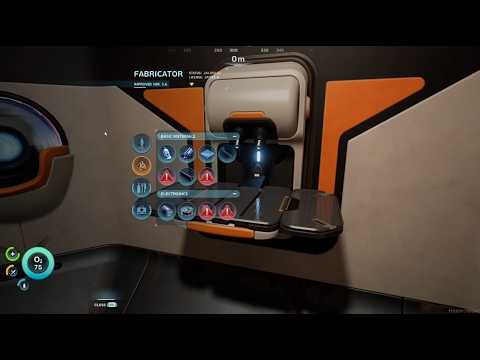 0:24–0:30 · 6 sUsing the new Fabricator on a base's interior wall
 1:13–1:21 · 8 sScanning the Processor in a dark habitat room
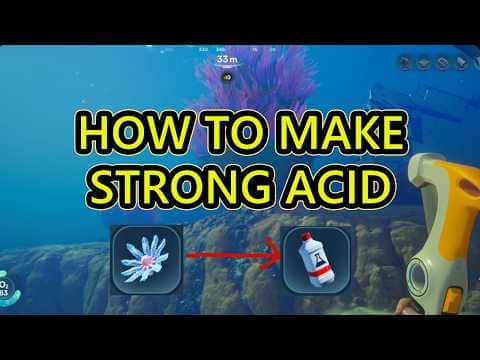 0:47–1:00 · 13 sFinding Stilt Orbs for Necrolei Cysts