Base power: generators, transmitter connections and outages
Quick answer
For steady power near a natural current, place a Hydroelectric Turbine where the placement preview shows output, then connect it through Power Transmitters to the base wall. Check incoming power, active demand and stored reserve before starting chargers or Metal Farms.
“Subnautica 2 How to Use Hydroelectric Turbine. How to Use Power Transmitter To Power Base.” by Ape Knight Gaming · May 17, 2026 · Early Access launch window (uploaded 2026-05-17); predates the Adaptive Measures and Buddy System updates
On screen: At about 20 m, a green Hydroelectric Turbine construction preview hangs in a pale stream of current between rocks with 12 shown above it; the diver places it and the finished white-and-orange turbine sits in the current.
Check the guide’s version notes before following older footage.
“Subnautica 2 How to Use Hydroelectric Turbine. How to Use Power Transmitter To Power Base.” by Ape Knight Gaming · May 17, 2026 · Early Access launch window (uploaded 2026-05-17); predates the Adaptive Measures and Buddy System updates
Enter the readings from your base while the machines you intend to use are running. If you only know a storage percentage, find the capacity first.
Use non-negative numbers up to 1,000,000. Blank fields are unknown, not zero. Example: 24 incoming, 30 demand and 600 stored gives 100 seconds of reserve.
Enter all three readings to calculate.
Estimate assumes constant readings and usable stored energy. It excludes day/night changes, fuel exhaustion, new loads and charge limits. Values stay in this page and are not connected to your save.
Near the base, the blue HUD reading shows generation and red shows demand. Compare them while the machines you intend to use are active. Storage holds surplus energy for later; it buys time during a deficit but cannot sustain one indefinitely.
Check the same setup at night, with the Tadpole docked and with processing or farming active. Record the lowest generation and highest demand you observe. The calculator below estimates a constant-load reserve duration from your own numbers.
Two turbines producing 12 each supply 24 energy/s. A Metal Farm’s reported demand of 20 leaves only 4 for everything else. This arithmetic is a planning example, not a measured base configuration.
If the complete base instead draws 30 while generating 24, the deficit is 6 energy/s. A reserve of 600 energy would cover 100 seconds at that unchanged load. A percentage reading must be converted using the actual storage capacity; do not enter “50” merely because the HUD shows 50%.
Buddy System fixed turbine shutdowns, transmitter visuals, stale solar output and several Metal Farm power faults. It also fixed depleted storage leaving bases powered. If a fault recurs on the current build, preserve the save and submit an in-game report rather than treating the old exploit as a power solution.
Symptom
Check next
No generator output
Current or heat placement, sunlight conditions, or available Bioreactor fuel.
Output at source; no increase at base
Trace transmitter links and the final attachment to the base wall.
Works until charging or farming starts
Read total active demand; reduce optional loads or add generation.
Works briefly, then fails
Watch stored energy. A falling reserve indicates a continuing deficit.
Client sees missing or extra beams
Compare the host’s view and actual base reading before rebuilding the chain.
Hotfix 2 reports fixes for Thermal/Hydroelectric Generators and Hydroelectric Turbines losing or displaying incorrect power after streaming out and back. If readings change after a trip, record the installed build, generator, host/client role and before/after readings alongside the load checks above. A patch report does not establish your current grid’s output or repair every old save.
Base construction and power facilities ↗Generator and terminal construction recipes; Modification Station cost. Habitat Beacon cost and reported placement atop a base section.Walkthrough ·
Base power sources and transmitter chain ↗Cross-check for generator recipes and output. Solar text conflicts internally and with VGC; exact solar values excluded.Walkthrough ·
Habitat and wreck scan locations ↗Named locations for power-facility scans. Raw coordinate conventions and inconsistent numeric coordinates are not adopted.Walkthrough ·
Buddy System Hotfix 2 — October 6, 2026 ↗Official October 6 release notes: voice detection, Tadpole docking and teleporting, power streaming, Scanner Station accuracy, Shiver interaction with unpiloted vehicles, Biobed and rack visuals, black-box signal names, Xbox memory and crash diagnostics. Rollout may take time; no Kingy reproduction or universal save recovery.Official ·
Stuck? Tell us where
Say where you’re stuck in Subnautica 2. You get one hint at a time from a published kingy.wiki guide, and the answer and its clip stay covered until you ask.
If nothing matches, we keep your words (without emails, links or long numbers) to decide which answers to write next. Privacy

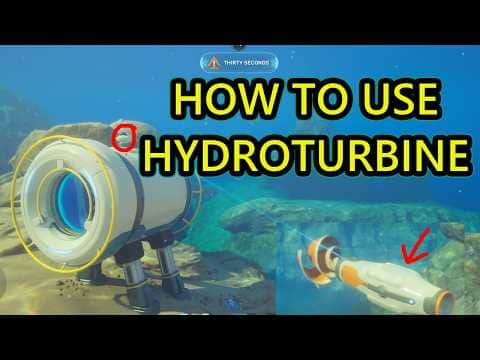 0:21–0:28 · 7 sPlacing a Hydroelectric Turbine where its preview reads 12