Scanner Station: unlock it and mark nearby resources
Quick answer
Scan a Scanner Station fragment, then use Habitat Builder to construct the facility with 3 Titanium, 1 System Chip and 1 Wiring Kit. Power it, choose a resource and select a displayed contact to mark a gathering destination.
“Subnautica 2 Scanner Station Location Guide. How to Get Scanner Station Blueprint Unlock” by Ape Knight Gaming · May 17, 2026 · Early Access launch window (uploaded 2026-05-17); predates the Adaptive Measures and Buddy System updates
Bring a charged handheld Scanner and enough oxygen for the fragment trip.
Unlock Habitat Builder and prepare a powered base interior. The linked base and crafting guides cover those prerequisites.
1
Choose a fragment stop
These are separate published routes. Scan the station fully and confirm the blueprint in your menu before returning. Distances are approximate; Kingy has not independently recorded either trip.
Older footage · checked Oct 25, 2026 · before Subnautica 2 Early Access 1.2 (Buddy System, August 19, 2026)
On screen: The diver swims through a round tube passage at about 35 m into a tilted room with windows at 22 m, scans a large station under a Scan Scanner Station prompt, and a Scanner Station notice appears at the left.
Check the guide’s version notes before following older footage.
“Subnautica 2 Scanner Station Location Guide. How to Get Scanner Station Blueprint Unlock” by Ape Knight Gaming · May 17, 2026 · Early Access launch window (uploaded 2026-05-17); predates the Adaptive Measures and Buddy System updates
Reserve the separate Wiring Kit as well as the finished System Chip. This table lists construction components; check your current recipes before converting them into a raw shopping list. Place the station inside your base and confirm power is available.
GameWith and PC Gamer report a 300-metre scan range. Treat that as the published range around the station, not a promise that every material exists near your base.
Interact with the powered station and choose the resource you need, such as Silver.
Older footage · checked Oct 25, 2026 · before Subnautica 2 Early Access 1.2 (Buddy System, August 19, 2026)
On screen: A Scanner Station inside a base shows SELECT SIGNAL above a SCANNER STATION panel with a SIGNALS FOUND row of resource icons; as a resource is highlighted, glowing contact dots appear on the rings around the station.
Check the guide’s version notes before following older footage.
“Subnautica 2 How to Use Scanner Station. How to Read Scanner Station and Explanation.” by Ape Knight Gaming · May 17, 2026 · Early Access launch window (uploaded 2026-05-17); predates the Adaptive Measures and Buddy System updates
Select one of its displayed contacts to create a tracking signal.
Follow the marker, then search the surrounding area for the actual resource node. Bring the appropriate gathering tool and leave enough oxygen for the return.
Scanning needs base power. Exact active and idle consumption are not independently established here; use your current HUD readings when planning the power budget.
Problem
Check next
Station will not scan
Check the base’s generation and demand with scanning active. The base-power guide below explains the readings and transmitter connections.
No useful contact
Confirm the selected resource and consider the reported scan range. A different gathering area may be needed.
Marker reached; no visible resource
Search around the indicated area and check that you selected the intended contact.
A filter is missing
Do not assume the station is broken. This guide does not verify every filter unlock or the rules controlling which filters appear.
Buddy System fixed the Scanner Station showing nonexistent resource nodes and using an Alterra icon for Bloom infestations. Earlier, Adaptive Measures fixed Sulfur detection in one Heat Zone of the Overgrown Ruins.
Those patch notes describe fixes, not a guarantee that every result in every save is correct. If a misleading contact persists on the released build after the checks above, record the location and report it through the game’s feedback tool.
Hotfix 2 reports fixing the Scanner Station not finding resources accurately. Check the installed update before relying on an older faulty-contact report. It supplies no new scan radius, filter-unlock rule or resource coordinates, and Kingy has not reproduced the fix.
Adaptive Measures update ↗July 8 release date, scan-progress and power-display fixes. Silver updates in Coral Gardens, nearby hint dialogue, misleading Sonic prompts and Silver nook pickup fixes. Storage excluded from nearby crafting and Moonpool size feedback.Official ·
Base construction and power facilities ↗Generator and terminal construction recipes; Modification Station cost. Habitat Beacon cost and reported placement atop a base section.Walkthrough ·
Crafting recipes: sustenance, stations and navigation ↗Corroborates selected meal, water, Fiber and First Aid Kit ingredients; not an exhaustive current-build database. Beacon and Habitat Beacon construction costs and Builder categories. Portable Oxygen Generator materials and Habitat Builder Utility category. Plasteel Ingot at Processor and selected Lithium portions for High Capacity Air Tank and Scout Ray. Silver portions for Standard Air Tank, Wakemaker, Wiring Kit, System Chip, Scanner Station and Silver Ingot. Power Cell table lists 1 Salt, matching Game Checklists and GameWith’s June recipe page.Walkthrough ·
Buddy System Hotfix 2 — October 6, 2026 ↗Official October 6 release notes: voice detection, Tadpole docking and teleporting, power streaming, Scanner Station accuracy, Shiver interaction with unpiloted vehicles, Biobed and rack visuals, black-box signal names, Xbox memory and crash diagnostics. Rollout may take time; no Kingy reproduction or universal save recovery.Official ·
Stuck? Tell us where
Say where you’re stuck in Subnautica 2. You get one hint at a time from a published kingy.wiki guide, and the answer and its clip stay covered until you ask.
If nothing matches, we keep your words (without emails, links or long numbers) to decide which answers to write next. Privacy
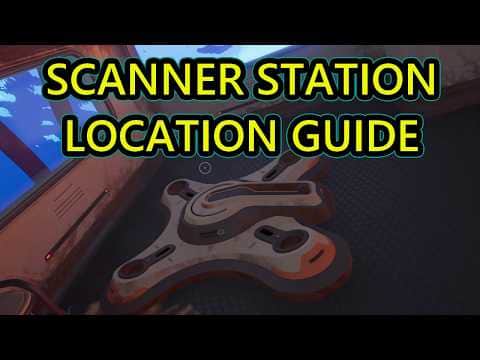 0:57–1:06 · 9 sScanning the Scanner Station fragment in a wrecked shelter
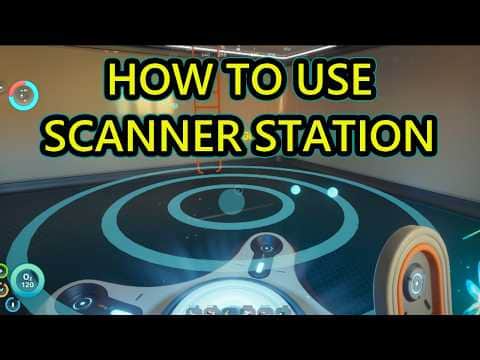 0:14–0:31 · 17 sChoosing a resource on the Scanner Station