Probably Stolen official cover art

Probably Stolen controls and first day: rotate items, buy, sell and check rent

Quick answer

Hold an item and press E or Q to rotate it 90°, F to flip it and R to reset it. To trade, drag an item onto the negotiation counter: the panel shows the price, your funds and the customer's budget. Close the shop, sleep at the sleeping bag, choose overnight services, and keep cash for rent. On day 2 our Calendar showed 200 credits of rent due on day 7.

Checked 9 Nov 2026 · after patch 100-Rev13 (8 Nov 2026)

How this guide was checked

Coverage: Latest official patches 1.0.0.12 (November 6) and the 100-Rev13 hotfix (November 8) · not retested since. Kingy retail tests: Windows / Steam build 26284217 · 100-REV3 · October 29–30, 2026 UTC. Original water, machine/charging, caffeine, crate/keycard and exchange tests · stamp handbook checked · customer-budget help uses attributed creator footage. Controls, first-day trades, menus and Store Attractiveness checked on build 26525552 (100-REV13), November 9, 2026.. Research checked 9 Nov 2026. Updated 9 Nov 2026

This guide uses the linked sources and any attributed demonstrations. Platform differences and limitations are noted with the advice they affect.

See the 3 sources
3 sources
Kingy played7 steps
Rotate, buy, sell, end the day, see when rent is due · 1:48
Silent with explanatory text. Original gameplay at normal speed, with cuts and enlarged UI. Windows / Steam build 26525552 (100-REV13), Apprentice / Mark Up (Normal), no perks, intro on, November 9, 2026. One purchase and one sale; bargaining was not tested. AI-operated and edited; game © Questing Goose Studio / tinyBuild. Test details and limits.

Before you start

  • Tested on Windows / Steam build 26525552 (100-REV13), Apprentice, Mark Up (Normal), no perks, intro on, November 9, 2026.
  • Key binds are the entries under Key Binds in our Options; we did not test rebinding them.
1

Every key bind we found in Options

Open Options (K) and scroll to Key Binds. These are the bindings our install showed on 100-REV13. Earlier test runs used this install, so read your own Options if a key does nothing. The bell's B key is confirmed by the developer's 1.0.0.5 notes. The tutorial's hint overlay labels Alt+click as quick transfer to the counter, while Options calls Left Alt quick move to storage.
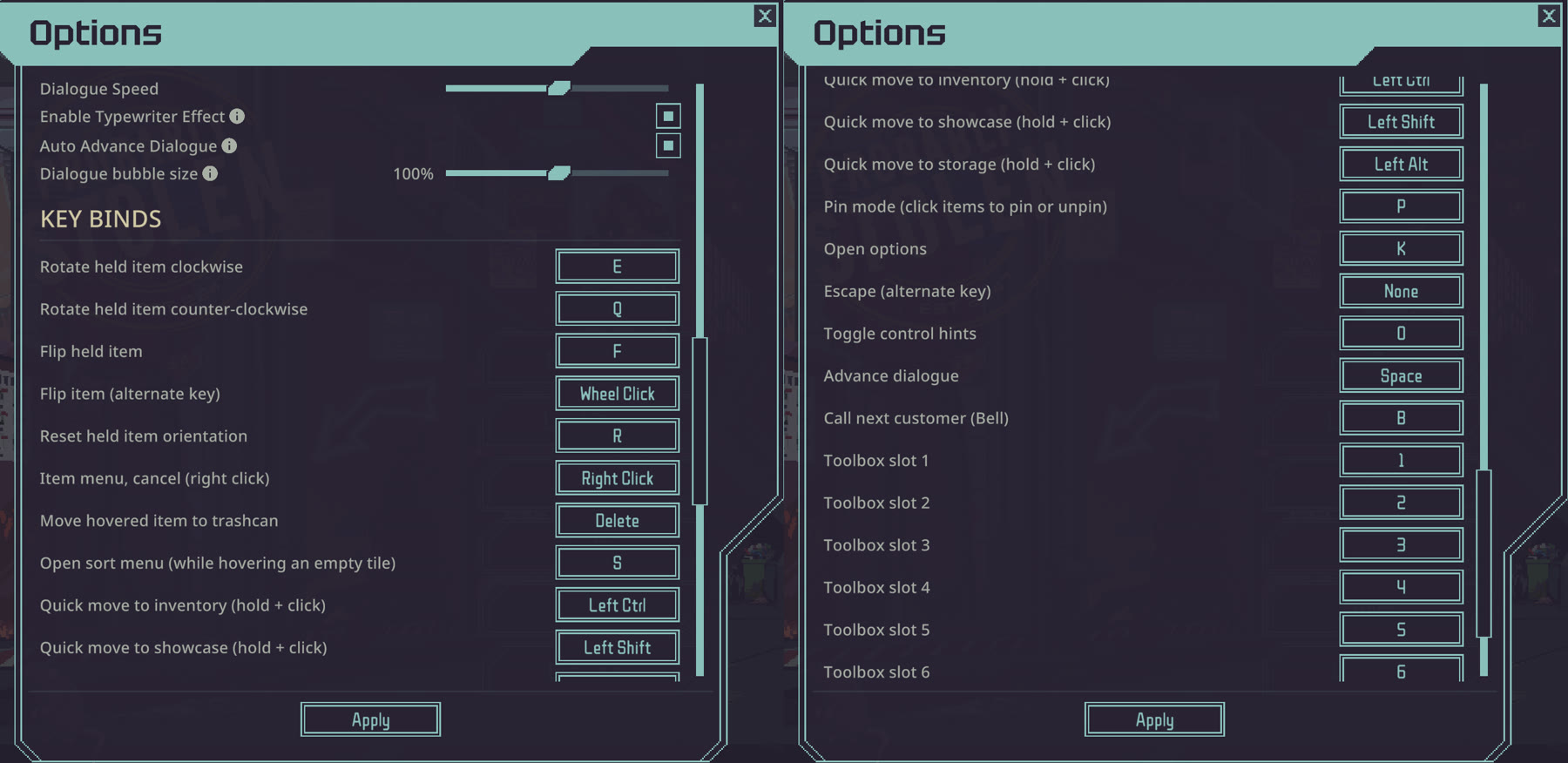
Two halves of the Options Key Binds list: rotate E and Q, flip F, reset R, sort S, quick moves on Ctrl, Shift and Alt, bell B, toolbox 1 to 9.
Options > Key Binds on our install.Kingy capture · build 26525552 (100-REV13), November 9, 2026 · Probably Stolen © Questing Goose Studio / tinyBuild · Open full-size diagram ↗
ActionKey shown
Rotate held item clockwise / counter-clockwiseE / Q
Flip held itemF (or mouse wheel click)
Reset held item orientationR
Item menu, cancelRight click
Move hovered item to trashcanDelete
Open sort menu (hover an empty tile)S
Quick move to inventory / showcase / storageHold Left Ctrl / Left Shift / Left Alt and click
Pin modeP
Open optionsK
Toggle control hintsO
Advance dialogueSpace
Call next customer (bell)B
Toolbox slots1–9
Sources for this section
2

Rotate, flip and sort items

Keys only work while you are holding an item. Our video shows a long tube in the inventory: E turned it upright, a second E turned it flat again, Q turned it back, F mirrored it, and R returned it to how it started.

Right-click an empty inventory slot (or press S over one) for the sort menu. It offers Sort to Top or Sort to Bottom, each Big First or Small First, plus Undo Sort. Right-click an item for its own menu, including Read for documents. The tutorial's hint overlay (O) labels the display case, negotiation counter, bell, sleeping bag and other parts of the shop.
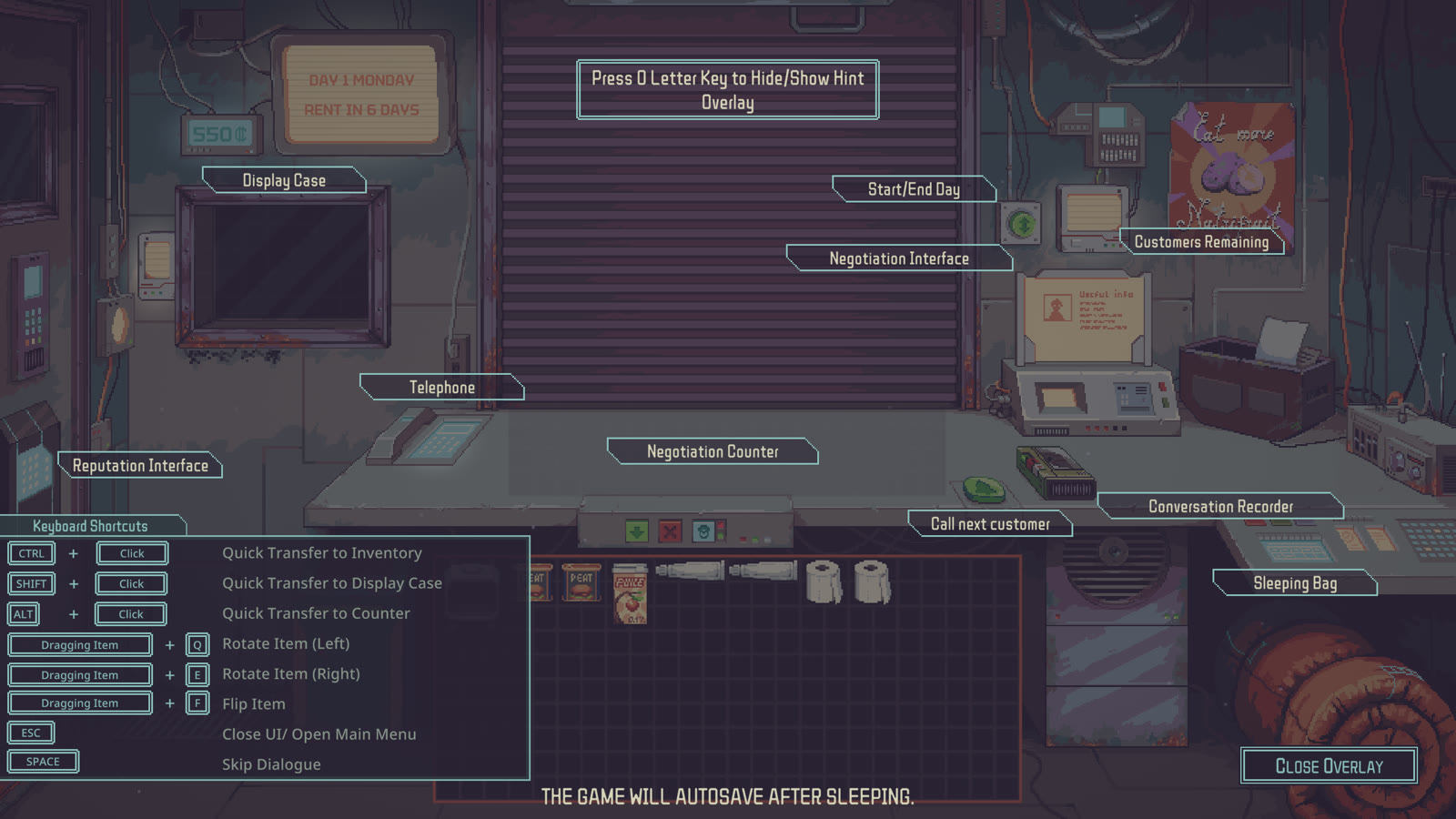
The game's hint overlay labelling Display Case, Telephone, Negotiation Counter, Call next customer, Sleeping Bag and keyboard shortcuts.
The hint overlay at the start of a new Apprentice run. Press O to show or hide it.Kingy capture · build 26525552 (100-REV13), November 9, 2026 · Probably Stolen © Questing Goose Studio / tinyBuild · Open full-size diagram ↗
Sources for this section
3

Buy from a seller

Items moved straight to our inventory because Move Bought Items to Inventory was on; update 1.0.0.12 added that option, on by default.

  1. Ring the bell (B) to call the next customer. A seller lays items on the outside counter.
  2. Drag the item you want onto the negotiation counter. The panel lists it under SELLING with the price, Your Funds and the Total.
  3. Click Buy. Our Galaxy Blend cost 25 credits: funds went from 550 to 525, and the item went straight into our inventory.
Sources for this section
4

Sell to a buyer within their budget

The Mentor's trading note says clients have a limited budget and that sales get a retail markup automatically. Mark Up (Normal) lists a 15% markup, which matched our sale. Items a buyer doesn't want show as Not interested. For buyers with bigger budgets, see Store Attractiveness in the customer budgets guide.

Store Attractiveness and customer budgets
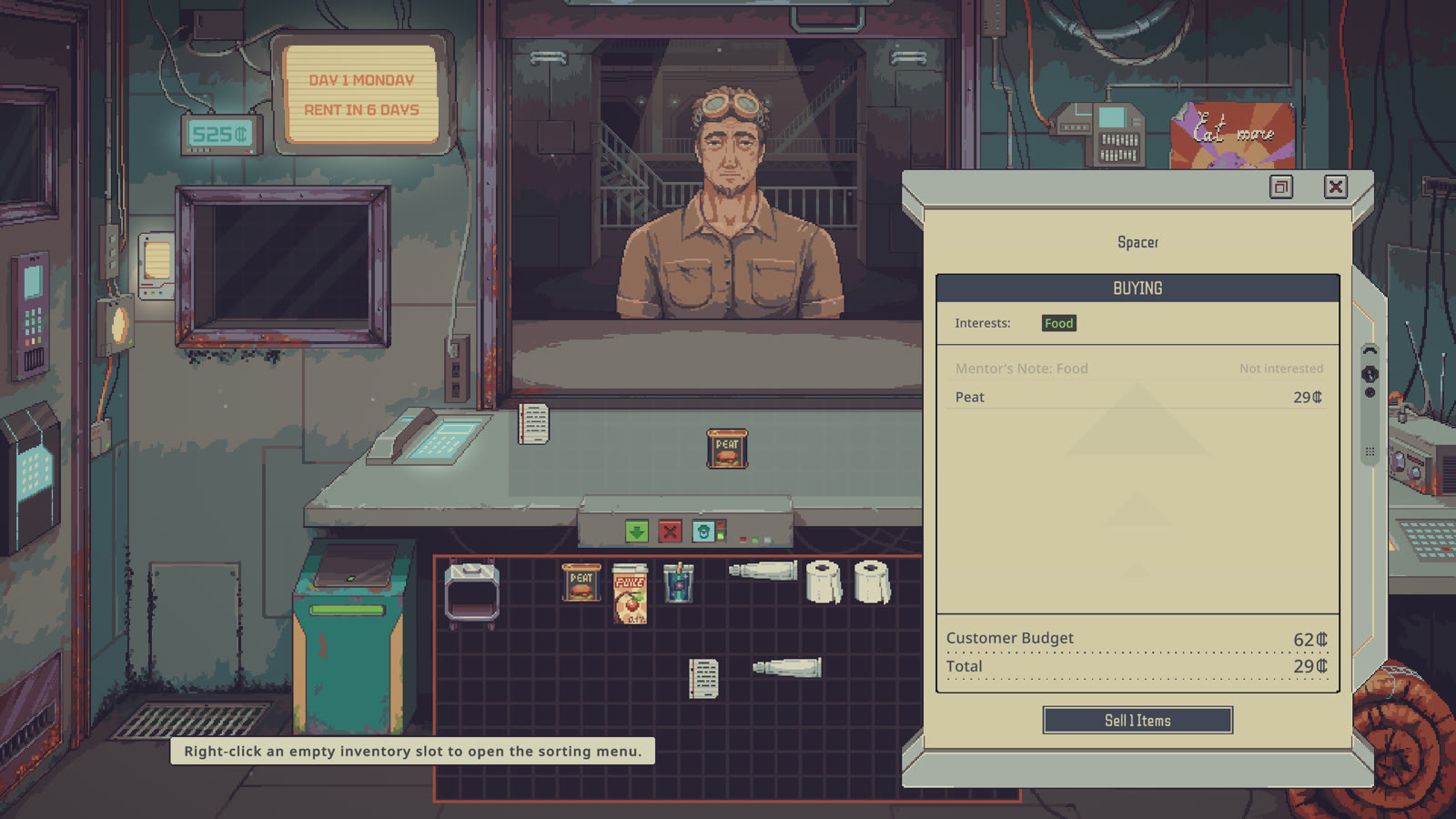
The sale panel: Spacer, Interests Food, Peat 29 credits, Customer Budget 62, Sell 1 Items.
Before the sale: 29 credits against a 62-credit budget.Kingy capture · build 26525552 (100-REV13), November 9, 2026 · Probably Stolen © Questing Goose Studio / tinyBuild · Open full-size diagram ↗
  1. Read what the buyer wants. Our Spacer asked for food, and the panel's Interests line said Food.
  2. Drag your item onto the negotiation counter. The panel moves it under BUYING with a price, and shows Customer Budget.
  3. Click the item line to see the price breakdown. Our Peat (base value 25) sold for 29 with Retail Markup (+15%).
  4. Click Sell. Our funds rose to 554 and the Spacer's budget fell from 62 to 33.
Sources for this section
5

End the day and choose services

On day 1 our only service was Power Service at 5 credits. Its tooltip says it keeps the store lit and grid devices running; unpaid, only machines on Energy Cells work and the lights dim. The next morning's Nightly Report confirmed the power bill was paid.

Machines that stop overnight

  1. Clear the outside counter. The Mentor warns not to leave anything there overnight.
  2. Click Close the Store once the queue is empty. The game won't end the day while important visitors are waiting.
  3. Click the sleeping bag. Tick the overnight services you want, then click End the Day. The game autosaves after sleeping.
Sources for this section
6

Rent, wealth and the property price

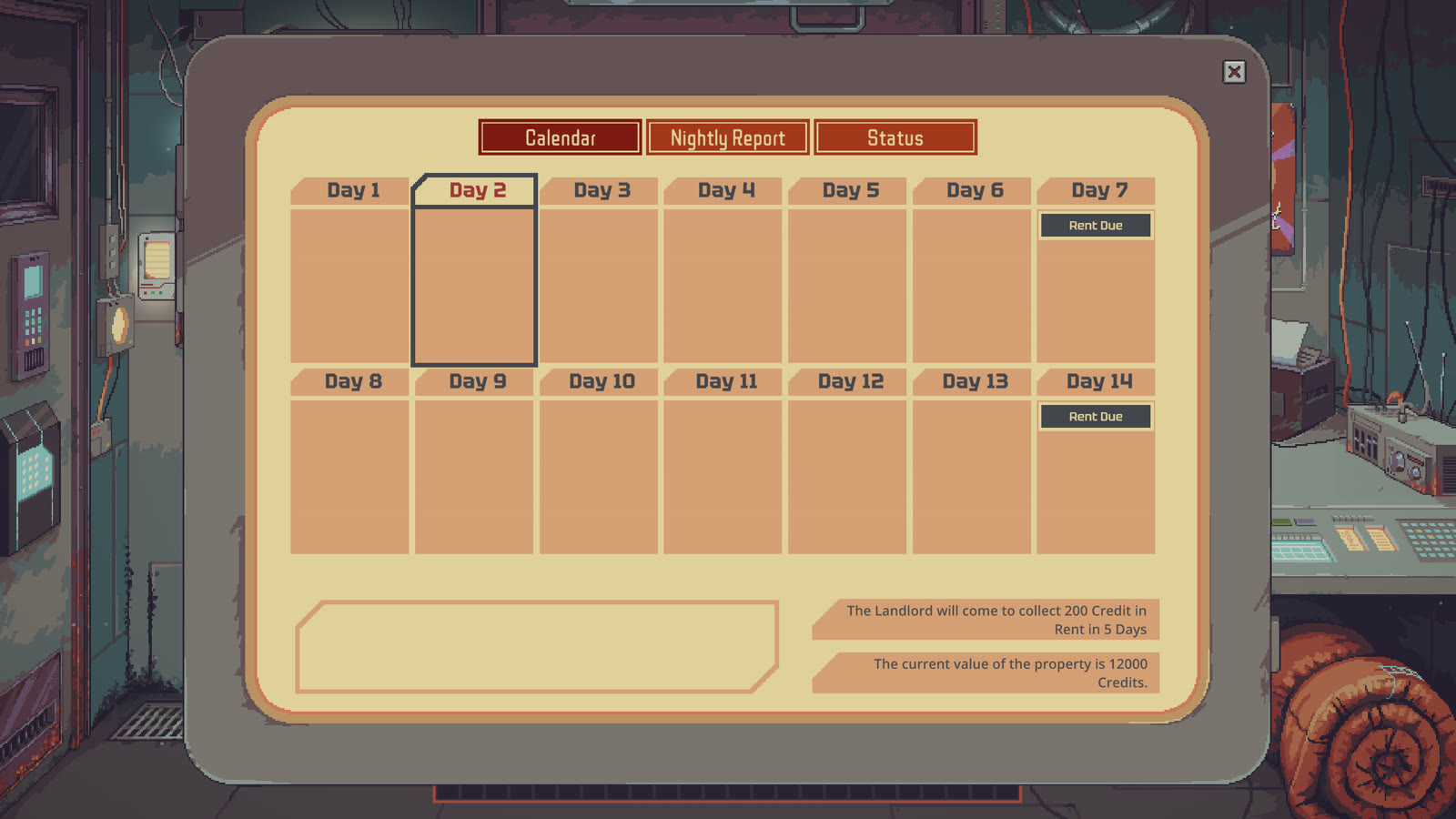
The morning screen has three tabs. Calendar marked Rent Due on day 7 and day 14 and said the Landlord would collect 200 credits in 5 days. It also said the property was valued at 12,000 credits. Status showed 549 credits and an Estimated Total Wealth of 768, higher than the cash alone.

Those figures are from our Apprentice run on Mark Up (Normal). The difficulty screen lists rent rising 2%, 5% or 10% each time depending on difficulty, and property prices that differ by difficulty. Check your own Calendar rather than copying 200 or 12,000.
What each difficulty changes

Calendar tab: Rent Due on days 7 and 14; the Landlord collects 200 credits in 5 days; property value 12000 credits.
Day 2 of our Apprentice / Mark Up run.Kingy capture · build 26525552 (100-REV13), November 9, 2026 · Probably Stolen © Questing Goose Studio / tinyBuild · Open full-size diagram ↗
Sources for this section
7

Test details and limits

Recorded in the user's purchased retail copy on November 9, 2026: Windows / Steam build 26525552, menu version 100-REV13, Apprentice, Mark Up (Normal), no perks, intro on. Day 1 to the morning of day 2. AI-operated through computer use and AI-edited; no gameplay was generated.

The 1:48 video is silent, at normal speed, with cuts and enlarged UI. Its captions are repeated in the text file linked below. We did not find a bargaining control in the trade panel, so this guide makes no haggling claim. Quick-move with Ctrl+click did not register through our automation input; dragging worked. That is a limit of our setup, not a game finding.

Video text (WebVTT)

Test record and source timestamps (JSON)

Sources for this section

You’re ready when…

Your checklist

0 of 5 complete · Loading saved progress…

Sources · 3Official · Walkthrough · checked 9 Nov 2026 · Research checked 9 Nov 2026
Hotfix & Bell Hotkey Rebind - 1.0.0.5 ↗Water Purifier price 300 to 250; rebindable counter-bell key (B); frame-rate cap follows the monitor; borderless fullscreen for non-16:9 screens; bandage plus Glass Shard makes a Glass Shiv. Official notes; not retested by Kingy.Official ·
Kingy retail test: controls, first trades, menus and day 2 (100-REV13) ↗First-hand Windows / Steam build 26525552 (100-REV13), Apprentice / Mark Up (Normal), no perks, intro on, day 1 to day 2 morning. Key binds, rotation, one purchase and one sale, end-of-day services, Nightly Report attractiveness markers, Calendar and Status read on screen; all 12 specializations, 48 perk tooltips and 4 difficulties read from the New Game menus. Perk effects and other starts not played. AI-operated (computer use) and edited; source timestamps in the evidence JSON.Walkthrough ·
Cumulative Update - 1.0.0.12 ↗Stock Water Purifier now cleans to 99.01% (was 99.00%); Moisture Farm 6 L nightly cap fixed; machine energy warnings; Power Line Hijack levels. Official notes; not retested by Kingy.Official ·

Stuck? Tell us where

Say where you’re stuck in Probably Stolen. You get one hint at a time from a published kingy.wiki guide, and the answer and its clip stay covered until you ask.

If nothing matches, we keep your words (without emails, links or long numbers) to decide which answers to write next. Privacy