DREADMOOR demo fishing: how to start, hook, tire and land a fish
Quick answer
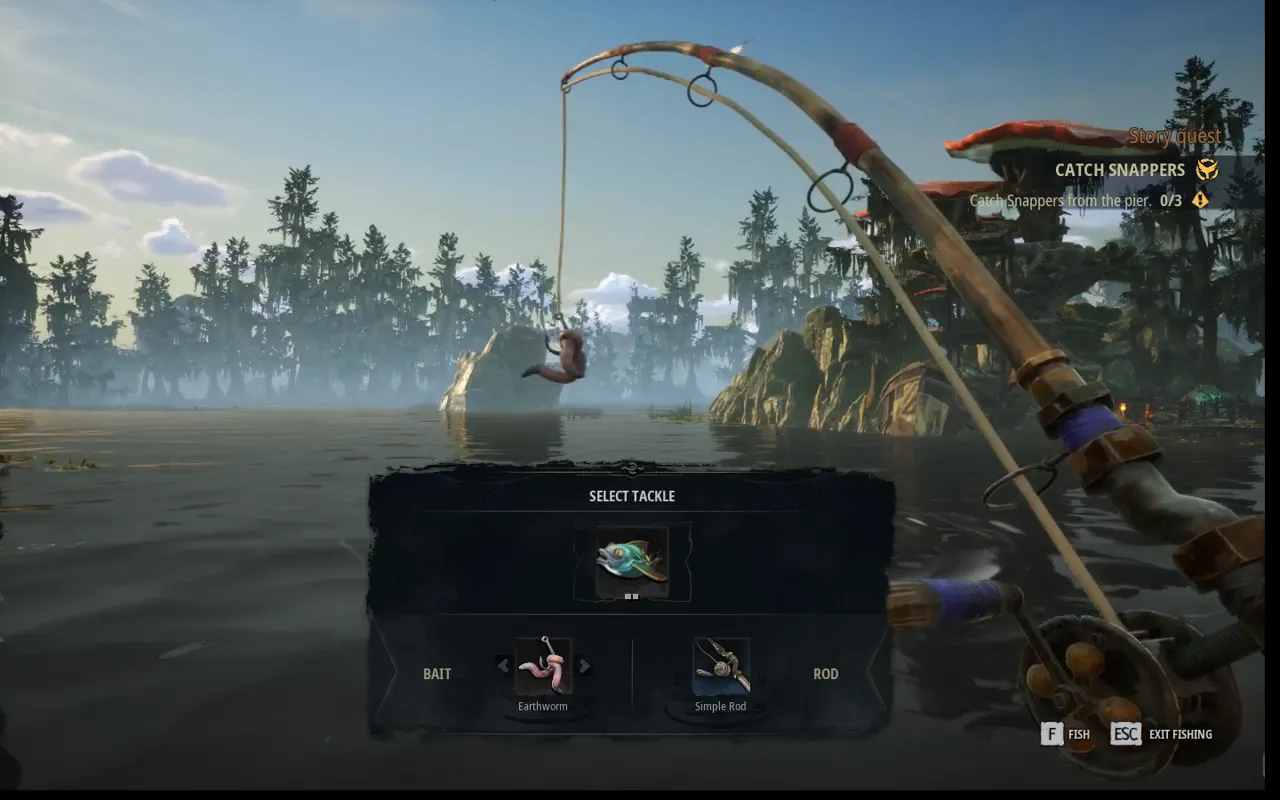
For Catch Snappers, stand on the quest marker on the walkway beside Gill and Bozur's platform and press F: Select Tackle opens with Earthworm bait and the Simple Rod, and F starts fishing. Hold left mouse to aim at the orange bite-zone arrows and release to cast, then keep the rod still. When a fish bites, a ring with a mouse icon appears near the bait: hold left mouse while it shows (quick taps never hooked for us). Then pull the opposite way to the fish with A and D (or the mouse) and hold left mouse to reel. Watch the line-tension gauge: at the red tip the line snaps. When the fish tires, stop pulling and hold left mouse at once, because it recovers; then press F to land it. Save to a manual slot first: in the demo build we played, Save Game was greyed out while fishing.
The fishing spot isn't on the open water in front of Gill and Bozur. Open the map: the quest marker sits on the edge of the trading post island. On foot, it's on the walkway beside their platform, by the post with orange floats and the half-sunk rowing boat.
Walk onto the marker and press F. Before that, F, E and R did nothing for us at the tackle-table railing or the far pier end.
Our inventory showed no bait, but Select Tackle offered Earthworm bait anyway, with the Simple Rod.
Press F again to start. A Bite Zones tip explains the cast: hold left mouse to aim, then release to cast into the bite zone. Orange arrows on the water mark the zones, and an arc shows where the bait will land; move the mouse to place it on an arrow.
Gill tells you to cast where the fish are splashing, then to wait without moving the rod or you'll scare the fish. While the bait is out, left mouse reels in and right mouse recasts.
When a fish bites, a ring with a mouse icon appears near the bait and an orange arc fills around it; the Hook Set tip says to press when the fish bites. In our recording the ring stayed up for a second or two at a time and came back a few times on one cast.
Quick taps didn't set the hook in our tries, and two casts with 0.6-second holds got nothing. Across two sessions all five of our hooks happened while left mouse was held: three from deliberate holds of about a second while the ring showed, one while we were already holding it to reel the line in, and one while we were holding it to aim a recast.
The first hook brings up a Rod Movement tutorial: choose mouse movement or the A and D keys to pull the rod. We picked A and D, which also switched Keyboard Fishing on in Settings. Confirming took holding F for a few seconds.
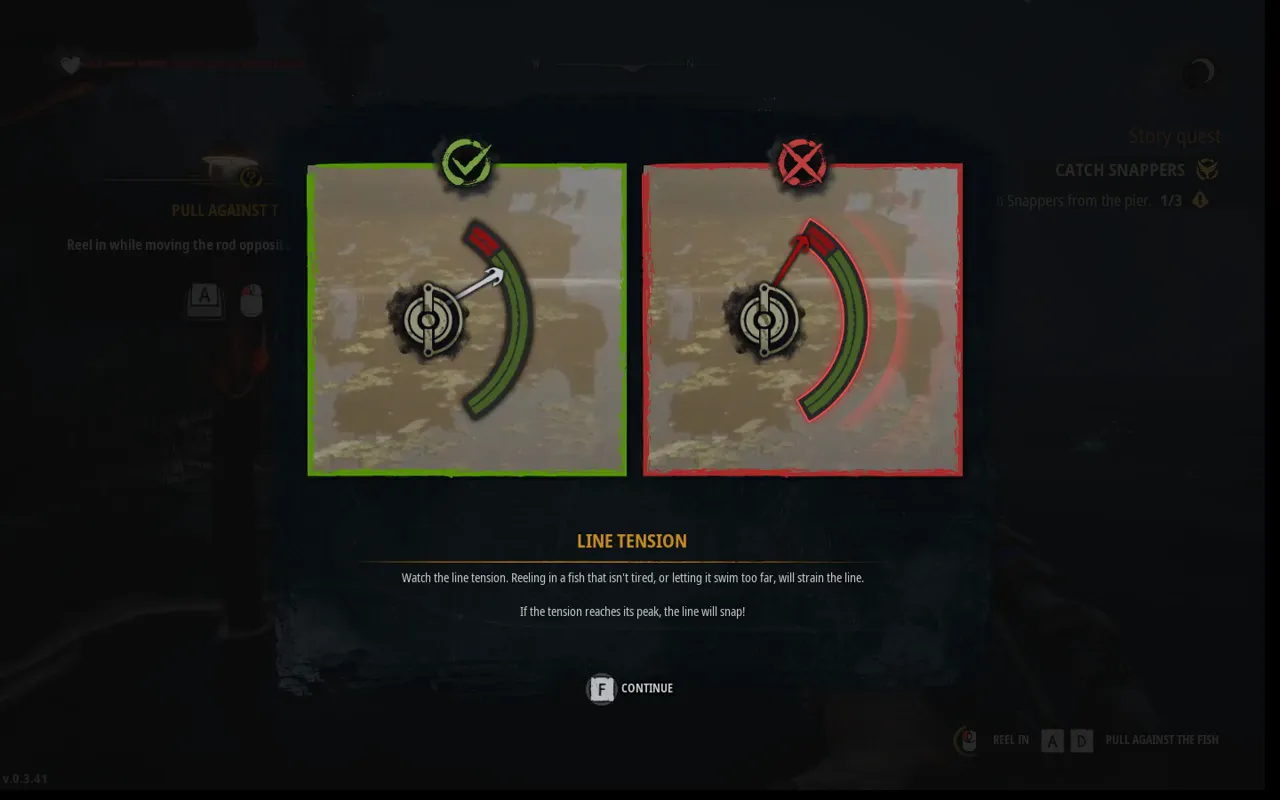
Once hooked, pull the rod the opposite way to the fish: the tutorial prompts said Pull left (A) or Pull right (D), then to reel in with left mouse while pulling. Two gauges appear: the fish's stamina on the left and line tension on the right.
A Line Tension tutorial warns that reeling in a fish that isn't tired, or letting it swim too far, strains the line, and the line snaps at the peak. We lost our second fish exactly that way: we kept reeling with the tension gauge in the red and it snapped.
A tired fish doesn't stay tired. When it gives in, a green icon and Hold to reel in the fish appear, and Gill warns that it slowly gets its strength back. Hold left mouse straight away. In a later session we kept pulling after that prompt, the stamina gauge refilled and we lost the fish.
Guided Fishing in the Game settings, off by default, shows on-screen prompts for which way to pull and changes colour if you pull the wrong way.
On screen: Checked on screen November 2: the Pull Against The Fish tip with the stamina and tension gauges, a landed Snapper's New Fish card (1.49 kg), then the next fight on the pier during Catch Snappers.
“This New Disturbing Fishing Game Has Me 100% Hooked! - DREADMOOR” by spkzworld · Oct 7, 2026 · Free demo footage, uploaded before our check; the Catch Snappers quest on the HUD matches the demo. The build number isn't legible in the frames we checked.
The game says reeling in a fish that isn't tired strains the line. We lost two fish by reeling with the needle in the red. On the second, we let go of left mouse about a second after it went red and the line still went. Easing off earlier is the obvious thing to try, but we haven't tested it.
When the fish is tired, the tip changes to Reeling In The Fish: hold left mouse to reel it in. A Land The Fish tip follows: when the fish is close, press F to pull it out of the water.
Our first catch was a Snapper: common fish, peaceful, 1.76 kg, one star of three, with New Fish and Glossary Updated on the card. F auto-sorts it into the hold and the quest moved to 1 of 3. Gill's next line was a dig about beginner's luck.
In a later session we reloaded an earlier save and landed another Snapper, 1.83 kg, which put the quest back at 1 of 3. The card's text covers peaceful fish in general: skittish, algae and insect eaters, mostly found in swamps, best caught with patience and careful handling.
In the demo build we played, Save Game was greyed out in the pause menu while fishing, and no autosave was written when the quest moved to 1 of 3. We also found no key that leaves fishing mode: Esc only pauses, and R, F, E and S did nothing for us. We didn't try every key.
That cost us our catch twice: our newest save was a manual save at 0 of 3, so the first Snapper (1.76 kg) was gone when we reloaded, and the second (1.83 kg) was gone when we quit. Save to a manual slot before you walk onto the marker.
The Game tab describes each fishing switch. Keyboard Fishing lets you fish with A and D. Immersive Fishing hides the fishing interface so you rely on the water and rod. Fish Struggle Indicators is on by default and the meters showed in our fights; the game describes it as hiding the stamina and tension meters, and we didn't toggle it. Fish Distance shows the exact distance to the fish. Guided Fishing shows which way to pull.
Guided Fishing was off again when we checked in a later session, although we'd switched it on in the earlier one. We don't know why. Check it on the Game tab before you fish.
Sources · 2Walkthrough · checked 2 Nov 2026 · Research checked 2 Nov 2026
Kingy test run: DREADMOOR demo, new game to the Catch Snappers job ↗Kingy's own session in the Steam demo on Windows 11, November 1–2, 2026 (PC local time): Steam build 26254439, in-game save version 0.3.41, mouse and keyboard, English. Covered the first-launch telemetry prompt, the main menu, the Game and Controls settings, a new game from waking in the shack through the axe, the pier, the radio, sailing to the trading post (including one death on the first attempt), mooring, the bell, Gill and Bozur, the chest, the flophouse repairs, sleeping to 10 AM, the Simple Rod and the start of Catch Snappers. Not covered: catching fish, the engineer, the dry dock, combat with a creature, a controller, and the rest of the demo. Silent clips and stills were recorded from the game window during the session. Saves were found in %LOCALAPPDATA%\Dreadmoor\Saved\SaveGames, and the Game tab showed gamepad, adaptive trigger and vibration options.Walkthrough ·
Kingy test run: DREADMOOR demo, the first fishing job ↗Kingy's own second session in the Steam demo on Windows 11, November 2, 2026 (PC local time): Steam build 26254439, mouse and keyboard. Covered starting Catch Snappers from the pier, Select Tackle, the bite-zone, hook-set, rod-movement and line-tension tutorials, choosing the A and D rod controls, landing one Snapper (1.76 kg) for 1 of 3, losing one when the line snapped, and the Guided Fishing, Immersive Fishing, Fish Distance and Fish Struggle Indicators descriptions in Settings. Not covered: the second and third Snappers, selling, the engineer, the dry dock and fishing from the boat. Silent clips and stills were recorded from the game window. A third session the same day (about 04:40 to 05:00 PC time, same build) reloaded the 12:15 AM manual save at 0 of 3, hooked three fish and landed one Snapper (1.83 kg), lost two (one after it recovered its stamina, one when the tension went red), found Guided Fishing off again, Save Game greyed out while fishing and no autosave after a catch, then quit without saving.Walkthrough ·
Stuck? Tell us where
Say where you’re stuck in DREADMOOR. You get one hint at a time from a published kingy.wiki guide, and the answer and its clip stay covered until you ask.
If nothing matches, we keep your words (without emails, links or long numbers) to decide which answers to write next. Privacy
 9:18–10:18 · 60 sPulling against a fish and landing a Snapper (creator's Fishing chapter)