How to Start Hytale Chapter I on an Existing World
Quick answer
Open your existing Exploration Mode world and head to the Forgotten Temple. Explore the new Goblin Lab to begin Chapter I, then follow the objectives on the Chapter screen. Hypixel Studios confirms this route for existing and new worlds in its October 12 announcement. Kingy has not independently tested it on an installed build.
“How to Fix The Goblin Generator in Hytale Chapter 1 | [Goblin Workbench]” by Pure Game Guides · Oct 13, 2026 · Chapter I / Update 7 release build, uploaded October 13
An existing Exploration Mode save and a client updated for Chapter I. For multiplayer, ask the host to identify the server build as well.
Kingy recommends preserving an untouched backup before first loading an important save after an update. No downgrade or backup restore is verified here.
1
You can use your existing Exploration world
The announcement explicitly includes existing Exploration Mode saves and brand-new worlds. You do not need to discard your existing world to follow the announced entry route. Creative Mode is outside the entry route described by this announcement.
Keep the original backup separate from the copy you open. The launch notes say existing worlds upgrade on their first load; the modder notes warn that cubic-world block-section saves use version 7 and cannot be read by older servers. Switching launcher branches does not convert upgraded data back.
The publisher identifies the Temple and Lab, but does not give a universal room-by-room route, door input or coordinate. Follow the prompts shown in your build. Kingy has not filmed this sequence or verified an objective-specific interaction.
The Ancient Gateway guide describes a separate crafted portal route with a reported 100-restored-Memory unlock. The Chapter I announcement directs players to the Goblin Lab; it does not list that Gateway recipe or Memory milestone as the Chapter entry requirement.
Inside the Forgotten Temple, follow the stone passage to the goblin-built stairs with purple banners and climb into the Goblin Lab. Look for the large glowing machine among the scrap.
“How to Fix The Goblin Generator in Hytale Chapter 1 | [Goblin Workbench]” by Pure Game Guides · Oct 13, 2026 · Chapter I / Update 7 release build, uploaded October 13
Since hotfix 0.7.1, both teleporters in the Forgotten Temple cost 25 Scraps and a Dubious Assembly to repair; before the hotfix the two had different costs. They now play a teleport sound when used. The notes do not say where to find a Dubious Assembly, so Kingy does not guess a source.
Follow the Chapter objectives into your first breach
Once the chapter opens, the announcement says a temporary Goblin Breach appears in the world. It regenerates on each entry, and the Void eventually forces you out. Fighting back the Void and upgrading the Goblin Breach Console in the Lab can extend your time.
Kingy’s preparation advice: repair gear, leave inventory space, bring supplies and note the return route before entering. Read any timer and objective on your screen. Exact breach timing, console costs and repeat-entry behavior are not measured here.
Checked on screen · Oct 25, 2026 · Chapter I / Update 7 release build
Head for the tall yellow light beam in your world and go through the Breach. Inside the Guttering Hollows, watch the countdown at the top right: it shows how long you have before the Veil closes.
“How to Fix The Goblin Generator in Hytale Chapter 1 | [Goblin Workbench]” by Pure Game Guides · Oct 13, 2026 · Chapter I / Update 7 release build, uploaded October 13
If the Goblin Lab or Chapter objectives are missing
These checks collect useful evidence; they do not diagnose a specific bug or prove a repair. Kingy has not checked platform-specific delivery, old-save conversion, mods or multiplayer entry.
What to check
Useful next action
Installed client/server build
Record both full build labels and the selected branch. An announcement alone does not prove that every installation has received the update.
World mode
Confirm this is Exploration Mode. The announced Chapter entry route does not cover Creative Mode.
World Events and mods
Read the affected world’s settings and installed mod versions. The launch notes document a World Events toggle; changing it is not a verified fix for a missing Lab.
Still no entry or objectives
Keep the save and backup. Capture the Temple/Lab screen, exact error or missing prompt, platform and build for a support report. Do not delete or recreate the world on the strength of this guide.
Use the Goblin Repair Kit when it becomes available
The launch notes confirm a new Goblin Repair Kit that repairs items without lowering maximum durability. See ordinary and Goblin Repair Kits before spending one. The announcement does not specify its recipe, workbench tier, unlock objective, repair amount or consumption rule.
For a useful comparison, identify the item and record current durability, maximum durability and kit count before and after. That captures what happened on your build without treating a durability percentage as proof that the maximum stayed unchanged.
Prop Hunt and Shuffle Jam are announced, but the explicit timing note says Minigames become available shortly after Chapter I launches. Keep their availability separate from the confirmed Chapter release; Kingy has not tested matchmaking or platform rollout.
Sources · 3Official · checked 23 Oct 2026 · Research checked 14 Oct 2026
Chapter I: Out of the Breach — launch announcement and patch notes ↗October 12 Chapter I release; existing/new Exploration worlds, Forgotten Temple Goblin Lab, Goblin Breach, Goblin Repair Kit, portal UI/commands, Memories and World Events. Minigames follow shortly after launch. Official statements; installed build and platform rollout not independently tested.Official ·
Update 7 modder-facing patch notes ↗Released Update 7: per-player portal entries, untimed configuration, configured instance persistence versus temporary portal-device worlds, timer-expiry disk removal and cubic-world save version 7. Technical options do not identify each shipped fragment or establish tested save recovery.Official ·
Update 7 hotfixes: 0.7.1 and 0.7.2 ↗Update 7 hotfixes through 0.7.3 (October 21): connection and packet crashes, hosted-world stalls, death durability setting, low-thread-count worldgen and Linux glibc 2.28 support; untested by Kingy.Official ·
Stuck? Tell us where
Say where you’re stuck in Hytale. You get one hint at a time from a published kingy.wiki guide, and the answer and its clip stay covered until you ask.
If nothing matches, we keep your words (without emails, links or long numbers) to decide which answers to write next. Privacy
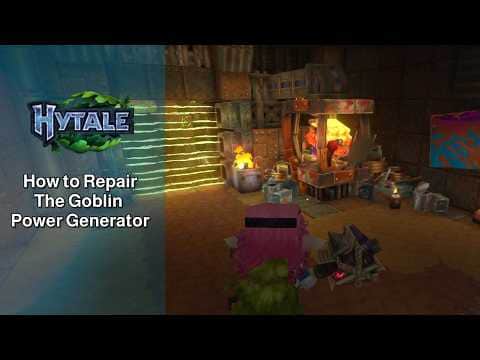 0:16–0:42 · 26 sInto the Goblin Lab inside the Forgotten Temple