
What PlayStation advertises for PS5
PlayStation advertises DualSense haptic feedback and adaptive triggers for claw combat, near-instant load times via the ultra-high-speed SSD, and Tempest 3D audio support for Marvel's Wolverine on PS5.
Evidence · 1 source
PlayStation (Sony Interactive Entertainment) — open original ↗See source record
- Locate
- 'Play Marvel's Wolverine on PlayStation 5' section: DualSense wireless controller haptics and adaptive triggers; 'Ultra-high-speed SSD ... near-instant load times'; 'Tempest 3D audio tech'.
- Supports
- PlayStation advertises DualSense haptic feedback and adaptive triggers for claw combat, near-instant load times via the ultra-high-speed SSD, and Tempest 3D audio support for Marvel's Wolverine on PS5.
- Limit
- Marketing descriptions of system features are not independent performance measurements.
Marvel's Wolverine uses the PS5 Pro's PlayStation Spectral Super Resolution (PSSR) feature, and the US storefront labels the game 'PS5 Pro Enhanced'.
Evidence · 1 source
PlayStation (Sony Interactive Entertainment) — open original ↗See source record
- Locate
- FAQ: 'Does Marvel's Wolverine use any PlayStation 5 Pro features?' - 'uses the PS5 Pro's PlayStation Spectral Super Resolution (PSSR) feature'; store feature list: 'PS5 Pro Enhanced'.
- Supports
- Marvel's Wolverine uses the PS5 Pro's PlayStation Spectral Super Resolution (PSSR) feature, and the US storefront labels the game 'PS5 Pro Enhanced'.
- Limit
- It does not state specific frame-rate or resolution targets; advertising PSSR is not a measured performance claim.
Storefront feature list
The US storefront lists Marvel's Wolverine as a one-player game with offline play enabled, Remote Play supported, Game Help and Power Saver support.
Evidence · 1 source
PlayStation (Sony Interactive Entertainment) — open original ↗See source record
- Locate
- Storefront metadata: 'Offline play enabled / 1 player / Remote Play supported / Game Help supported / Power saver supported'.
- Supports
- The US storefront lists Marvel's Wolverine as a one-player game with offline play enabled, Remote Play supported, Game Help and Power Saver support.
- Limit
- It does not describe online features, co-op or cross-play, and lists are storefront summaries that can change.
Rating, content toggles and purchases
The US storefront lists the rating descriptors 'Blood and Gore, Drug Reference, Intense Violence, Partial Nudity, Strong Language' and notes in-game purchases, and the game includes violence and adult language toggles that alter dynamic blood, dismemberment and English-only adult language.
Evidence · 2 sources
PlayStation (Sony Interactive Entertainment) — open original ↗See source record
- Locate
- Storefront rating line: 'Blood and Gore, Drug Reference, Intense Violence, Partial Nudity, Strong Language / In-Game Purchases'.
- Supports
- The US storefront lists the rating descriptors 'Blood and Gore, Drug Reference, Intense Violence, Partial Nudity, Strong Language' and notes in-game purchases, and the game includes violence and adult language toggles that alter dynamic blood, dismemberment and English-only adult language.
- Limit
- The storefront does not state which rating board filed the rating or its age category.
PlayStation.Blog - Aaron Jason Espinoza, Senior Community Manager, Insomniac Games — open original ↗See source record
- Locate
- 'we included new categories for violence and adult language toggles. These alter dynamic blood and dismemberment, and filters for English-only adult language.'
- Supports
- The US storefront lists the rating descriptors 'Blood and Gore, Drug Reference, Intense Violence, Partial Nudity, Strong Language' and notes in-game purchases, and the game includes violence and adult language toggles that alter dynamic blood, dismemberment and English-only adult language.
- Limit
- The article does not describe the toggles' on-by-default states or slider ranges.
Accessibility: what is confirmed
| Comparison | Insomniac article (Aug 28, 2026) | PlayStation FAQ | US storefront (35 features) |
|---|---|---|---|
| Named examples | High Contrast visuals, Audio Description (English), Global Game Speed, Strong Haptic Signals | Gameplay assists, motion sensitivity, visual filters, audio settings, subtitle sizes and colors, violence customization | Visuals, Audio, Subtitles and Captions, Controls, Gameplay |
| Full list location | Insomniac support list rechecked October 8 through the public API; earlier direct retrieval limits remain recorded | Links to the Insomniac support list | Store page lists 35 features with descriptions |
Marvel's Wolverine includes over 100 new, returning and improved accessibility features compared with previous Insomniac games.
Evidence · 1 source
PlayStation.Blog - Aaron Jason Espinoza, Senior Community Manager, Insomniac Games — open original ↗See source record
- Locate
- 'Marvel's Wolverine also includes over 100+ new, returning and improved Accessibility Features from previous Insomniac games, like High Contrast visuals, Audio Description (English), Global Game Speed, and Strong Haptic Signals.'
- Supports
- Marvel's Wolverine includes over 100 new, returning and improved accessibility features compared with previous Insomniac games.
- Limit
- The article counts features across categories and improvements without a category-by-category count, and its '100+' phrasing is a publisher count, not a third-party audit.
PlayStation's FAQ says launch accessibility options cover categories including gameplay assists, motion sensitivity, visual filters, audio settings, subtitle sizes and colors, and violence customization.
Evidence · 1 source
PlayStation (Sony Interactive Entertainment) — open original ↗See source record
- Locate
- FAQ: 'These cover categories like gameplay assists, motion sensitivity, visual filters, audio settings, subtitle sizes and colors, and violence customization.'
- Supports
- PlayStation's FAQ says launch accessibility options cover categories including gameplay assists, motion sensitivity, visual filters, audio settings, subtitle sizes and colors, and violence customization.
- Limit
- The FAQ gives examples rather than a complete category list. The linked support article returned 403 on September 14 and was read directly on September 27; current gameplay has not yet been tested.
The US storefront lists 35 accessibility features across Visuals, Audio, Subtitles and Captions, Controls, and Gameplay, including screen reader support, controller remapping and adjustable difficulty.
Evidence · 1 source
PlayStation (Sony Interactive Entertainment) — open original ↗See source record
- Locate
- 'Accessibility features (35)' with categories Visuals, Audio, Subtitles and Captions, Controls, Gameplay; examples include 'Screen Reader (Advanced)', 'Controller Remapping (Advanced)' and 'Adjustable Difficulty (Advanced)'.
- Supports
- The US storefront lists 35 accessibility features across Visuals, Audio, Subtitles and Captions, Controls, and Gameplay, including screen reader support, controller remapping and adjustable difficulty.
- Limit
- Sony's store summary is a platform feature checklist, not Insomniac's complete in-game list, and feature presentation may vary by region.
Performance: what is advertised vs verified
The October 8 official-source check confirms QSSR on PS5 and advertised PSSR on PS5 Pro, but the fetched records do not give numerical resolution or frame-rate targets. Kingy has not measured performance.
Evidence · 1 source
PlayStation.Blog — Daniel Craig, Principal Engineer, Graphics R&D, Sony Interactive Entertainment — open original ↗See source record
- Locate
- QSSR on PS5 and PSSR on PS5 Pro announcement, with qualitative image-detail and stability descriptions.
- Supports
- The October 8 official-source check confirms QSSR on PS5 and advertised PSSR on PS5 Pro, but the fetched records do not give numerical resolution or frame-rate targets. Kingy has not measured performance.
- Limit
- Documented settings and publisher descriptions are not measured frame rates or resolution targets.
Historical 01.001.006 collectible-cue toggles
Hotfix 01.001.006 adds on/off Senses toggles for Whisky Bottle Scent Trails, Material Crate Audio Clues and Nightmare Door Roots. Story-critical Senses still appear in the world.
Evidence · 1 source
Insomniac Games — open original ↗See source record
- Locate
- Official support article, hotfix notes and closing clarification (lines 14–26).
- Supports
- Hotfix 01.001.006 adds on/off Senses toggles for Whisky Bottle Scent Trails, Material Crate Audio Clues and Nightmare Door Roots. Story-critical Senses still appear in the world.
- Limit
- The note does not give a menu path, default toggle states or behavior in an installed build. Kingy did not test gameplay.
What changed in 01.001.005?
Hotfix 01.001.005 reduces the opacity of Scent Trails and Audio Sense indicators to make those visuals less intense.
Evidence · 1 source
Insomniac Games — open original ↗See source record
- Locate
- Public support API article body, third paragraph: presentation changes and reduced opacity.
- Supports
- Hotfix 01.001.005 reduces the opacity of Scent Trails and Audio Sense indicators to make those visuals less intense.
- Limit
- Insomniac gives no opacity value, setting path or per-effect controls. Kingy has not measured the visual change in gameplay.
The 01.001.005 note describes toggleable Senses options as something Insomniac is exploring for a future update; it does not announce a shipped on/off toggle.
Evidence · 1 source
Insomniac Games — open original ↗See source record
- Locate
- Public support API article body, final paragraph: possible toggleable options in a future update.
- Supports
- The 01.001.005 note describes toggleable Senses options as something Insomniac is exploring for a future update; it does not announce a shipped on/off toggle.
- Limit
- This is not a commitment to a toggle or a release date. It does not prove the absence of every existing accessibility option; no menu or later build was tested.
Which crashes did hotfix 01.001.005 address?
Insomniac deployed hotfix 01.001.005, addressing some common crashes reported by a small percentage of players since launch.
Evidence · 1 source
Insomniac Games — open original ↗See source record
- Locate
- Public support API article body, first and second paragraphs: deployed hotfix and crash scope.
- Supports
- Insomniac deployed hotfix 01.001.005, addressing some common crashes reported by a small percentage of players since launch.
- Limit
- The note does not say all crashes are fixed or identify every crash trigger. Kingy has not reproduced or tested these fixes.
What else changed in hotfix 01.001.006?
Insomniac says hotfix 01.001.006 addresses several crashes identified through crash logs and community reports.
Evidence · 1 source
Insomniac Games — open original ↗See source record
- Locate
- Official support article, first sentence and first hotfix bullet (lines 14 and 21).
- Supports
- Insomniac says hotfix 01.001.006 addresses several crashes identified through crash logs and community reports.
- Limit
- The note does not identify every crash or guarantee that all crash causes are fixed. Kingy did not test an installed build.
Hotfix 01.001.006 fixes an issue where players could become stuck while sliding down a tree in “The One That Got Away.”
Evidence · 1 source
Insomniac Games — open original ↗See source record
- Locate
- Official support article, hotfix notes (line 22).
- Supports
- Hotfix 01.001.006 fixes an issue where players could become stuck while sliding down a tree in “The One That Got Away.”
- Limit
- The note does not say whether installing the hotfix recovers an already-stuck save or provide a recovery procedure. Kingy did not test the fix.
Hotfix 01.001.006 also fixes misaligned claws in Photo Mode, rare white objects after extended play, and an overlapping casino bathroom sign caused by a UV-mapping issue.
Evidence · 1 source
Insomniac Games — open original ↗See source record
- Locate
- Official support article, hotfix notes (lines 23–25).
- Supports
- Hotfix 01.001.006 also fixes misaligned claws in Photo Mode, rare white objects after extended play, and an overlapping casino bathroom sign caused by a UV-mapping issue.
- Limit
- The note does not provide repro steps, frequency beyond the “rare” object issue, or details of any installed-build test. Kingy did not test these fixes.
English voices not playing with English selected?
If English voices do not play while English is selected in-game, update Marvel’s Wolverine. Insomniac says version 01.001.004 addressed the mismatch when the PS5 console language was not English.
Evidence · 1 source
Insomniac Games — open original ↗See source record
- Locate
- Support answer, current recommendation and original-issue explanation.
- Supports
- If English voices do not play while English is selected in-game, update Marvel’s Wolverine. Insomniac says version 01.001.004 addressed the mismatch when the PS5 console language was not English.
- Limit
- This does not establish the audio options or download behavior for every purchase region, and Kingy has not tested language switching. The older console-language workaround is not the first step after the fix.
Adjust combat timing, dodge behaviour and cue colours
If defensive inputs feel too strict, inspect Dodge/Parry Input Timing. Insomniac lists a setting that changes the available response time. Dodge Mode separately offers Default, Single Tap, Continuous Hold and Toggle; Default uses one tap to dodge and two to roll.
Evidence · 1 source
Insomniac Games Support — open original ↗See source record
- Locate
- Gameplay Assists: Dodge/Parry Input Timing and Dodge Mode.
- Supports
- If defensive inputs feel too strict, inspect Dodge/Parry Input Timing. Insomniac lists a setting that changes the available response time. Dodge Mode separately offers Default, Single Tap, Continuous Hold and Toggle; Default uses one tap to dodge and two to roll.
- Limit
- The support list gives no frame counts, interaction with Adaptations, trophy effect or current menu path. Kingy has not tested the controls on PS5.
Combat Game Speed adjusts stealth and active combat to 100%, 70%, 50% or 30%. Global Game Speed is a separate setting. For cue visibility, inspect Parry Threat Color Customization and Dodge Threat Color Customization.
Evidence · 1 source
Insomniac Games Support — open original ↗See source record
- Locate
- Gameplay Assists: speed settings; Visual Assists: parry/dodge threat colours.
- Supports
- Combat Game Speed adjusts stealth and active combat to 100%, 70%, 50% or 30%. Global Game Speed is a separate setting. For cue visibility, inspect Parry Threat Color Customization and Dodge Threat Color Customization.
- Limit
- The support list gives no frame counts, interaction with Adaptations, trophy effect or current menu path. Kingy has not tested the controls on PS5.
Kingy suggests changing one relevant setting, then retrying a familiar encounter. Keep a note of the original value and use Recent Settings to find changes. Check your own cue colours before following colour-based combat advice. This practice routine has not been playtested.
Evidence · 1 source
Insomniac Games Support — open original ↗See source record
- Locate
- Gameplay Assists: Recent Settings; Visual Assists: configurable combat cues.
- Supports
- Kingy suggests changing one relevant setting, then retrying a familiar encounter. Keep a note of the original value and use Recent Settings to find changes. Check your own cue colours before following colour-based combat advice. This practice routine has not been playtested.
- Limit
- The support list gives no frame counts, interaction with Adaptations, trophy effect or current menu path. Kingy has not tested the controls on PS5.
Current Senses control: story Scent trails in 1.002.001
The latest Wolverine update listed in the official support records checked October 8, 2026 is 1.002.001. Kingy has not inspected an installed PS5 build.
Evidence · 1 source
Insomniac Games Support — open original ↗See source record
- Locate
- Both pages of the updated_at-ordered API index and the current Wolverine patch section.
- Supports
- The latest Wolverine update listed in the official support records checked October 8, 2026 is 1.002.001. Kingy has not inspected an installed PS5 build.
- Limit
- This identifies the latest documented patch in the fetched records, not what every console has installed or what might be announced later.
Update 1.002.001 adds control over story-related Scent trails through the Hint button, whose default binding is R3. This extends the earlier collectible-cue toggles.
Evidence · 1 source
Insomniac Games Support — open original ↗See source record
- Locate
- Opening paragraph and first patch bullet describing story Scent trails and the Hint input.
- Supports
- Update 1.002.001 adds control over story-related Scent trails through the Hint button, whose default binding is R3. This extends the earlier collectible-cue toggles.
- Limit
- R3 is the default button binding, not a stated default visibility setting. The note gives no menu path or promise that every story audio cue can be disabled. No Kingy gameplay test.
Insomniac says 1.002.001 addresses additional community-reported crashes and bugs. It does not identify individual issues or promise that every crash is fixed.
Evidence · 1 source
Insomniac Games Support — open original ↗See source record
- Locate
- Introductory stability paragraph and second patch bullet.
- Supports
- Insomniac says 1.002.001 addresses additional community-reported crashes and bugs. It does not identify individual issues or promise that every crash is fixed.
- Limit
- No exhaustive crash list or assurance that an already-blocked save is repaired. Kingy has not tested the fixes.
QSSR and accessibility fixes in 1.002.000
Update 1.002.000 adds Quick Spectral Super Resolution (QSSR) on PS5, enabled by default. Sony describes better image detail and stability; PS5 Pro’s PSSR is a separate feature.
Evidence · 2 sources
Insomniac Games Support — open original ↗See source record
- Locate
- Opening paragraph and first patch bullet: QSSR on PS5, enabled by default.
- Supports
- Update 1.002.000 adds Quick Spectral Super Resolution (QSSR) on PS5, enabled by default. Sony describes better image detail and stability; PS5 Pro’s PSSR is a separate feature.
- Limit
- The note gives no numerical resolution or frame-rate targets. Kingy has not measured image quality or performance.
PlayStation.Blog — Daniel Craig, Principal Engineer, Graphics R&D, Sony Interactive Entertainment — open original ↗See source record
- Locate
- October 1 announcement distinguishes QSSR on PS5 from PSSR on PS5 Pro.
- Supports
- Update 1.002.000 adds Quick Spectral Super Resolution (QSSR) on PS5, enabled by default. Sony describes better image detail and stability; PS5 Pro’s PSSR is a separate feature.
- Limit
- Publisher image-quality descriptions are not independent performance measurements. The default setting comes from the Insomniac patch note.
Update 1.002.000 reports UI, Photo Mode, out-of-bounds and visual fixes, some progression and crash fixes, accessibility fixes for Navigation Assist, Lock-On, High Contrast and Screen Reader, and localization fixes.
Evidence · 1 source
Insomniac Games Support — open original ↗See source record
- Locate
- Full patch notes: the four bullets following QSSR.
- Supports
- Update 1.002.000 reports UI, Photo Mode, out-of-bounds and visual fixes, some progression and crash fixes, accessibility fixes for Navigation Assist, Lock-On, High Contrast and Screen Reader, and localization fixes.
- Limit
- The note does not list every affected mission or language, guarantee save recovery or establish that all related issues are solved.
Checked on screen · Oct 12, 2026
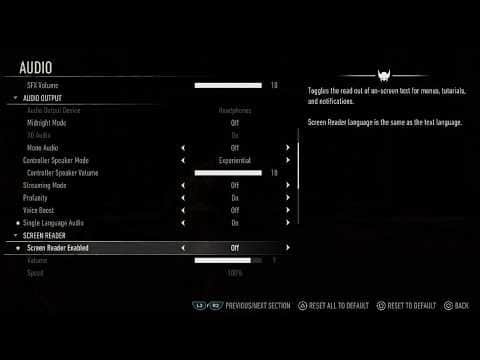 0:03–0:40 · 37 sTurning the Screen Reader on or off: Settings › Audio › Screen Reader
Open Settings › Audio and scroll past the volume and Audio Output rows to Screen Reader, then set Screen Reader Enabled on or off; its Volume and Speed sit just below.
Victor - Blind Journalist & Accessibility AdvocateFull video ↗Credits
“How to turn off narration / TTS in Marvel's Wolverine” by Victor - Blind Journalist & Accessibility Advocate · Sep 14, 2026 · Launch week (uploaded Sep 14, 2026); predates updates 1.002.000 and 1.002.001
Independent creator · no partnership implied
Did this answer your question?