Football Manager 27 official cover art

FM27 beginner guide: set up your save and first hour

Quick answer

Start with a manageable game world, choose your transfer mode carefully, then set rolling saves. Before advancing, check responsibilities, contracts and squad depth. Kingy’s suggested first-hour route ends with one tactical plan and one recruitment priority, rather than a shopping list.

Checked 10 Nov 2026 · before Update 27.1.0 (16 Nov 2026)What changed

How this guide was checked

Coverage: FM27 launch · November 10, 2026 · Update 27.1.0 changelist published November 16, rollout due that week · PC/Mac workflows from official sources and attributed creator tutorials. Research checked 10 Nov 2026. Updated 10 Nov 2026

This guide uses the linked sources and any attributed demonstrations. Platform differences and limitations are noted with the advice they affect.

See the 6 sources
6 sources
6 steps

Before you start

  • Use the full PC/Mac edition of Football Manager 27. Console, Touch and Netflix Mobile differ; check Editions and access if unsure.
  • Create a named save before making major changes. The steps below combine official mechanics with Kingy’s suggested decision process; they have not been playtested by Kingy.
1

Watch the FM27 walkthrough

FM27 creator tutorial · full video

ChesnoidGaming’s full FM27 starting-save tutorial, selected by Sports Interactive. The sponsorship disclosure is visible above the player.

By ChesnoidGaming · 0:00–32:57 · Creator-disclosed sponsored video for Sports Interactive.

Link to this moment ↗

HERE’S HOW FM 27 WORKS!!

ChesnoidGaming · Original video hosted on YouTube.

Evidence and limits

Sports Interactive links this exact video in its FM27 tutorial library. Public player metadata confirmed title, creator, duration and embedding on November 10, 2026. This is a full-video reference, not an independently reviewed sequence or a Kingy gameplay test.

YouTube connects when you load the player. No autoplay. If playback is unavailable, use the YouTube link.

Keep the written steps open while you watch. Pause when you reach the matching decision in your own save. The creator’s club and results are examples; use your own squad, rules and budget.

Sources for this section
2

Choose the world you actually want to manage in

Quick Start builds a world around your chosen club. Advanced Setup gives you more control over leagues, database and other starting settings. Begin with the competitions you want to manage in and the recruitment markets that matter to your intended career. Watch the Estimated Game Speed indicator as you add leagues and players.

Kingy’s recommendation for a first save: choose a club whose squad you can recognise and a league whose rules you are willing to read. A familiar team makes it easier to spot the difference between a poor player fit and an unfamiliar menu. You can attempt a wider career once you understand how quickly your computer processes your preferred world.
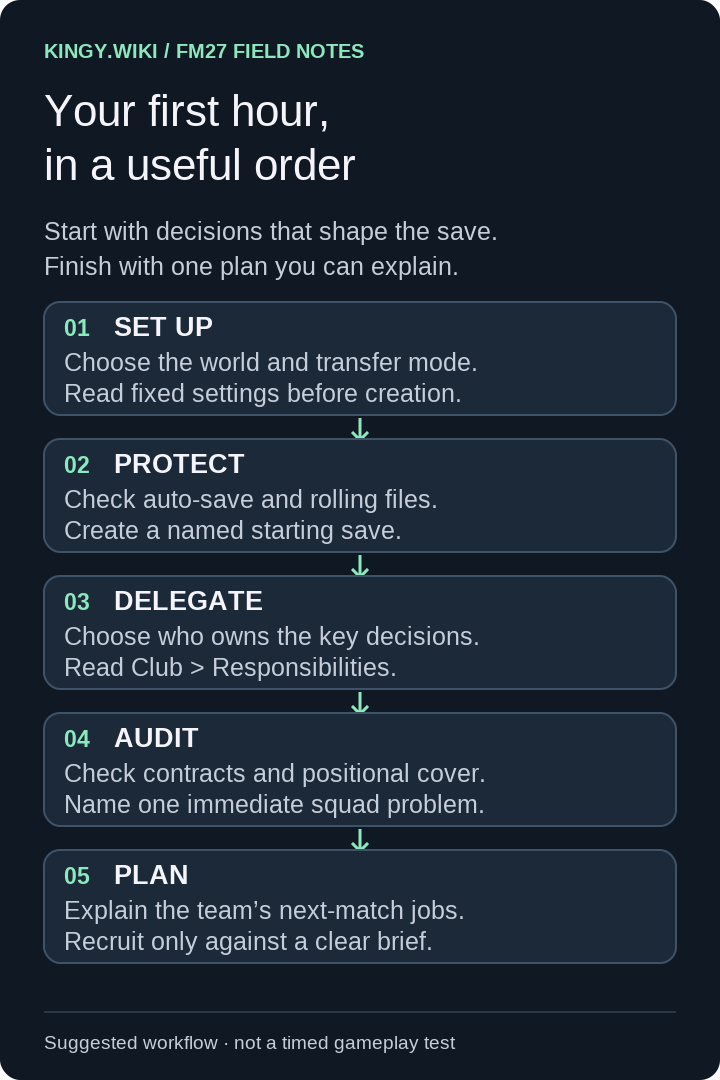
First-hour route: setup, save, delegate, audit, plan.
Suggested order. Time spent on each stage depends on your club and familiarity.Original Kingy instructional diagram; not a Football Manager screenshot. · Open full-size diagram ↗
Before creating the saveDecide now
League selectionWhere you want to manage; playable versus view-only
Transfer modeWhich starting version of the squad you want
Advanced settingsRead every checkbox; SI says these cannot be changed after creation
Manager profileChoose experience, qualifications and style deliberately
Sources for this section
3

Pick the transfer history that matches your expectations

If a player appears to be missing, check this setting and the save date before assuming the database is broken. Kingy’s suggested check is to compare the player’s expected transfer date with the mode you selected. These modes describe the starting world; they do not promise that every later AI decision will reproduce real life.

ModeWhat the official setup guide saysChoose it when…
Original SquadsCompleted real-world transfers are reflected from the start, even before their actual datesYou want the updated squad immediately
Real WorldTransfers happen on their real-world dates as your save progressesYou want the transfer calendar to unfold
Your WorldStarting-season club and player data remain, without subsequent real-world movesYou want to make the later transfer decisions yourself
Sources for this section
4

Protect progress, then choose what you manage

Kingy’s beginner recommendation is to retain final say over incoming deals while you learn what your club can afford. Delegating a task can save time, but you still need to read the resulting advice or proposed action. Rolling files are useful recovery points; they are not a separate backup of your computer.
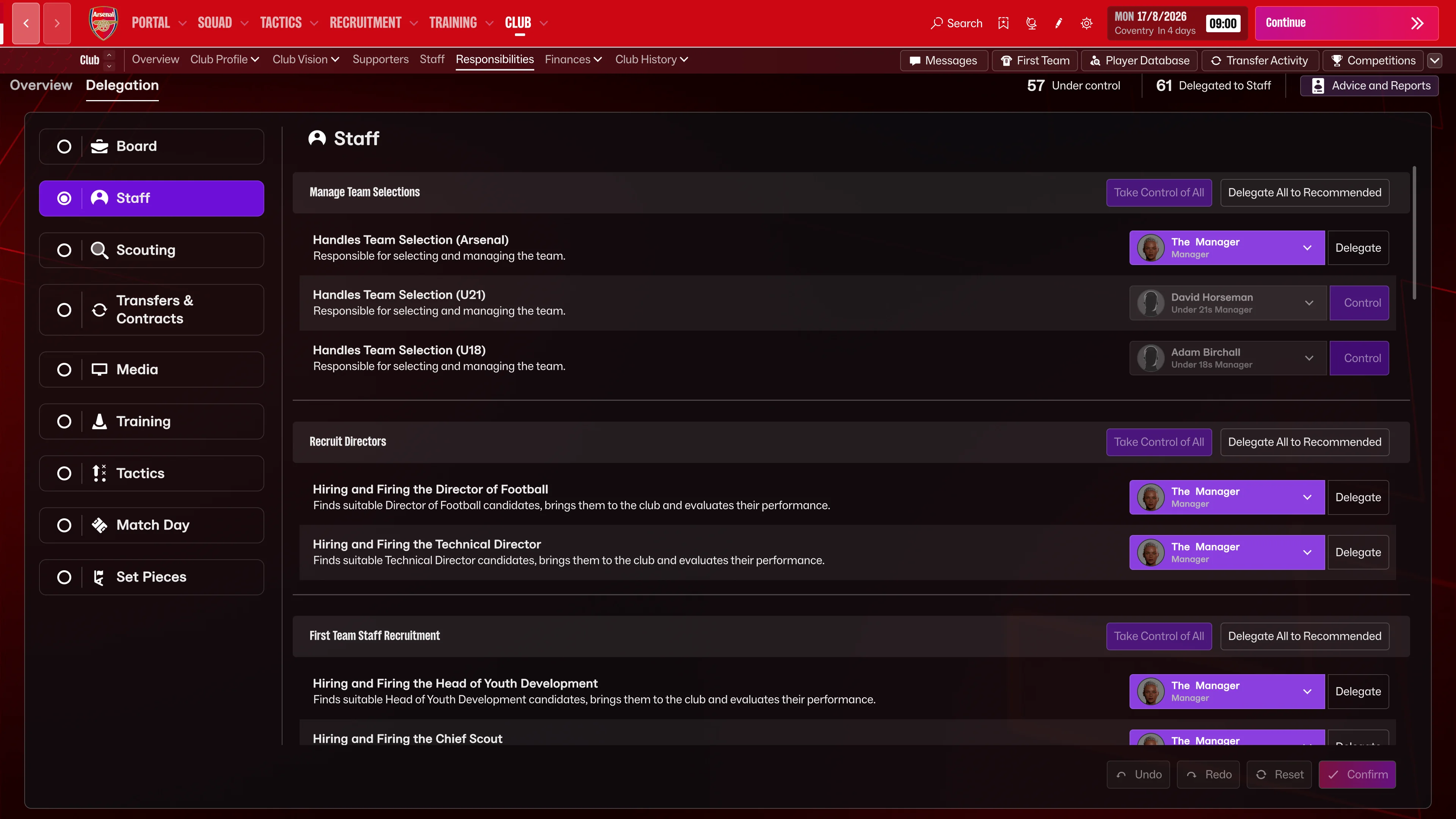
FM27 Club Responsibilities screen with task assignments to manager and staff.
Read the responsibility and the assigned person together before advancing.Sports Interactive / SEGA, official FM27 feature article. Development-build image; interface and example values may differ from your save. · Open full-size diagram ↗
  1. Open Settings > Preferences and check auto-save, save frequency and multiple rolling files. Make a named starting save you can recognise.
  2. Open Club > Responsibilities. Keep control of the decisions you want to learn first and assign the rest to suitable staff. Read who controls transfers, contracts, training and friendlies.
  3. Set a small set of navigation bookmarks: Squad, Tactics, Training, Player Database and Responsibilities. Use the secondary navigation to reach the relevant screen.
  4. After changing responsibilities, check the named staff member rather than assuming an action is delegated because you have an assistant.
Sources for this section
5

Audit the inherited squad before opening negotiations

Make a short note in this format: “We need a player who can do [job] because [current option] cannot provide it consistently.” For example, “We need cover for the only fit left-back before a congested month.” This is a recruitment brief you can test against candidates, unlike “sign more wonderkids.”
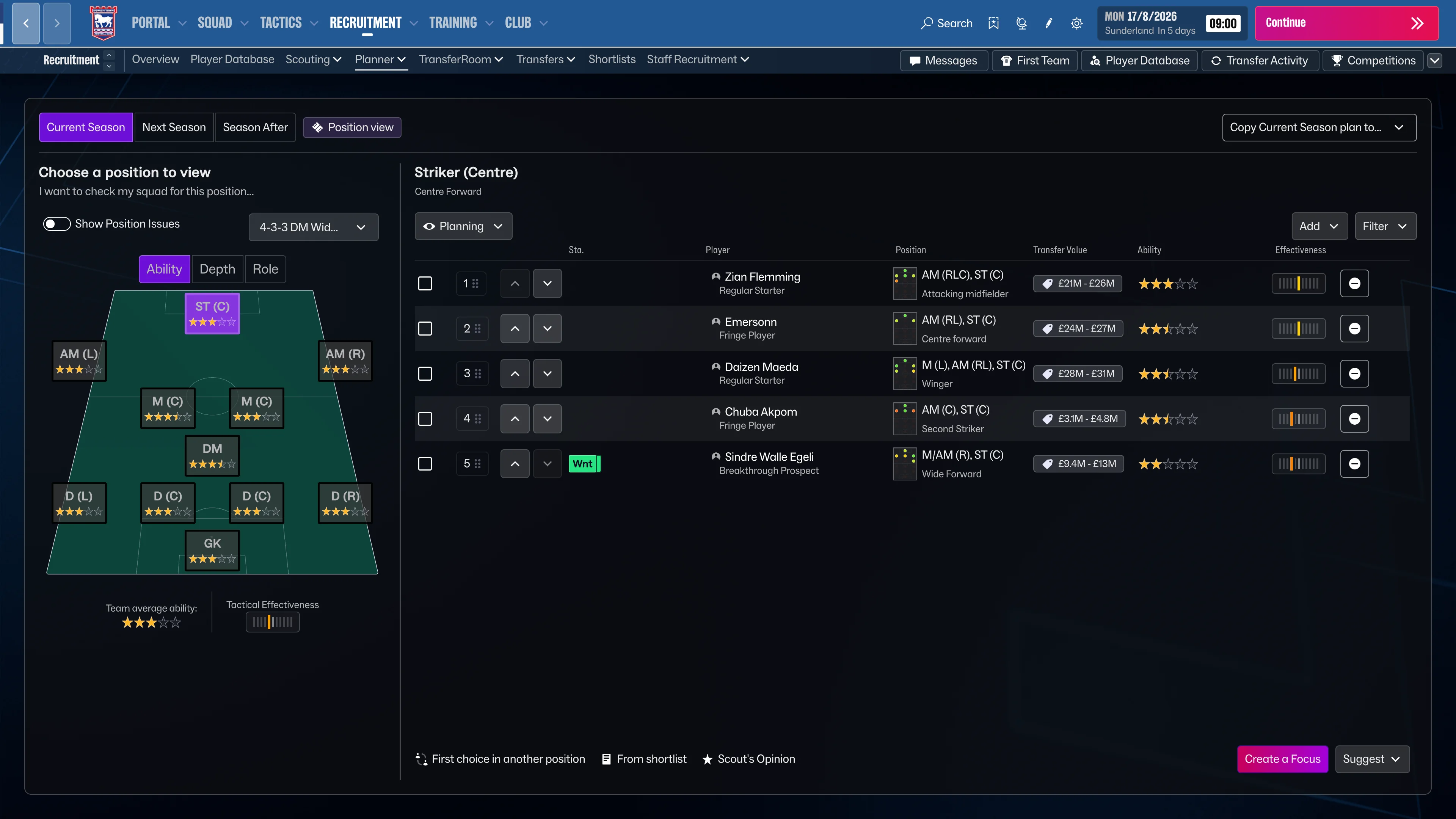
Official FM27 Squad Planner showing positional coverage and squad assessments.
Inspect the players behind a weak position before committing to a transfer.Sports Interactive / SEGA, official FM27 feature article. Development-build image; interface and example values may differ from your save. · Open full-size diagram ↗
  1. Open the Contracts squad view. Identify short contracts, release clauses and the largest wage commitments.
  2. Use Squad Planner and Team Report to identify the positions with weak coverage. Check the actual players behind each assessment.
  3. Look through youth and reserve squads for a player who can cover one of those jobs.
  4. Read board expectations, the fixture list and your available budgets. Pick one immediate squad weakness to solve.
Sources for this section
6

Finish with a plan you can explain

Choose a starting shape that gives your strongest available players suitable jobs in both possession phases. Write down how the side should move the ball forward, create an opening and protect itself when possession is lost. The tactics guide turns those questions into a repeatable setup.

Before clicking Continue, know who controls your key tasks, which contract needs attention, which position lacks cover and what you expect to see in your first friendly. You do not need to solve the entire season on the first day.

Build your first tactical plan

Turn a squad weakness into a scouting brief

Sources for this section

You’re ready when…

Your checklist

0 of 5 complete · Loading saved progress…

Sources · 6Official · Walkthrough · checked 10 Nov 2026 · Research checked 10 Nov 2026
FM27 tutorials and video guides ↗Publisher-curated FM27 creator videos. Exact YouTube IDs cross-checked against public player metadata; availability and embedding allowed when checked. Curation is not independent gameplay verification.Official ·
Top Tips for Starting Your First FM27 Save ↗PC/Mac career setup, transfer modes, fixed advanced settings and manager profile. Kingy adds a suggested decision order.Official ·
Maximising Your First Hours on FM27 ↗Squad Planner, contracts, Club > Responsibilities, scouting range, quick filters and rolling saves. Official interface screenshots retain their original development-build labels.Official ·
Tactical Effectiveness: Understanding FM27’s Key New Feature ↗Four components, phase-specific role suitability, coaches, buy-in and opposition information. Kingy’s troubleshooting tables are suggested applications, not measured outcomes.Official ·
FM27: Clearer Interface and Smoother Navigation ↗Primary and secondary navigation, landing screens, custom views, bookmarks, remappable shortcuts and screen scaling.Official ·
HERE’S HOW FM 27 WORKS!! ↗Start a save, manager setup and responsibilities. Creator-disclosed sponsored video for Sports Interactive. Publisher placement, title, creator, duration and embed availability checked; full video provided. No frame-by-frame review, transcript extraction or Kingy gameplay test.Walkthrough ·

Stuck? Tell us where

Say where you’re stuck in Football Manager 27. You get one hint at a time from a published kingy.wiki guide, and the answer and its clip stay covered until you ask.

If nothing matches, we keep your words (without emails, links or long numbers) to decide which answers to write next. Privacy