Queen's Domain on PC: controls, requirements, Steam Deck, the DX12 option, 16:10 and mouse feel
Quick answer
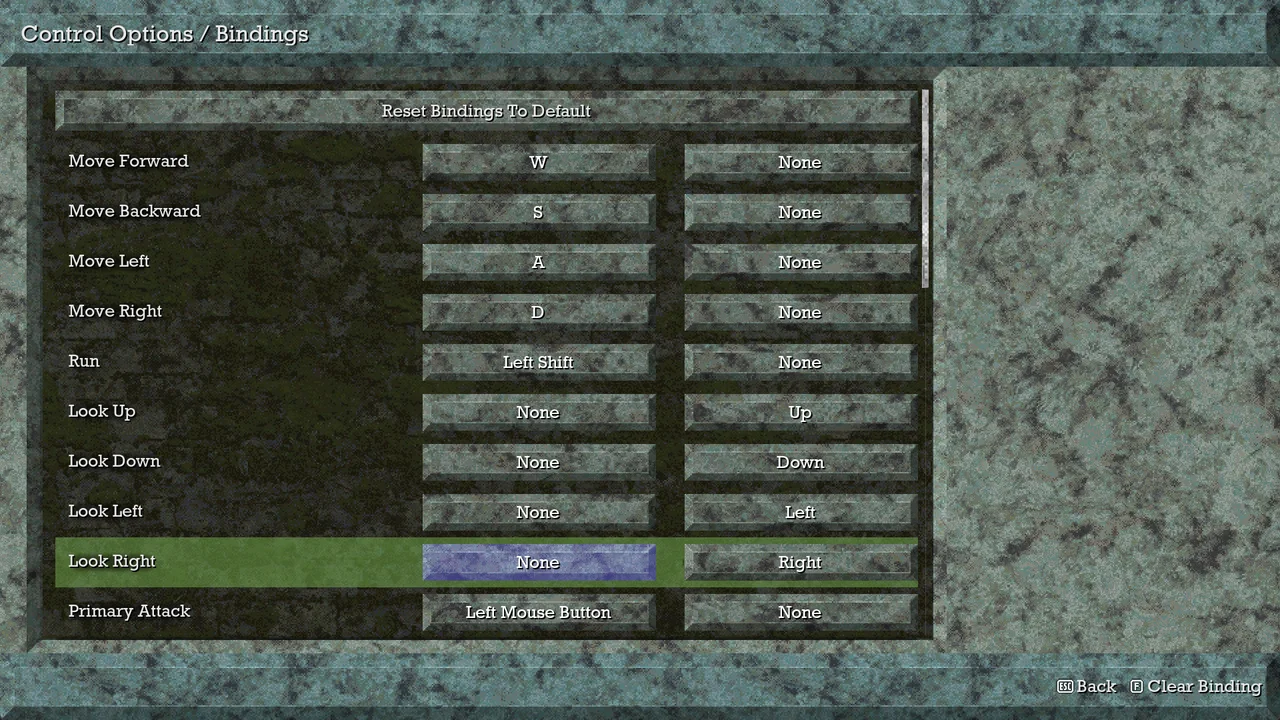
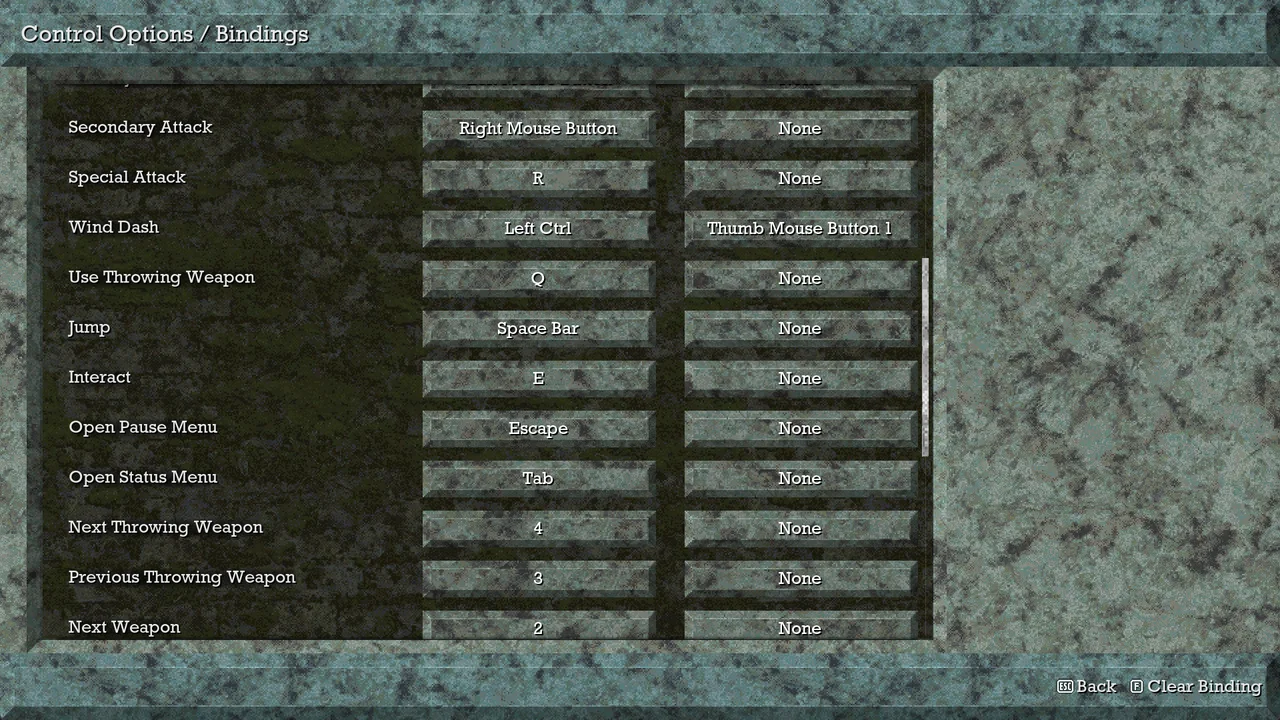
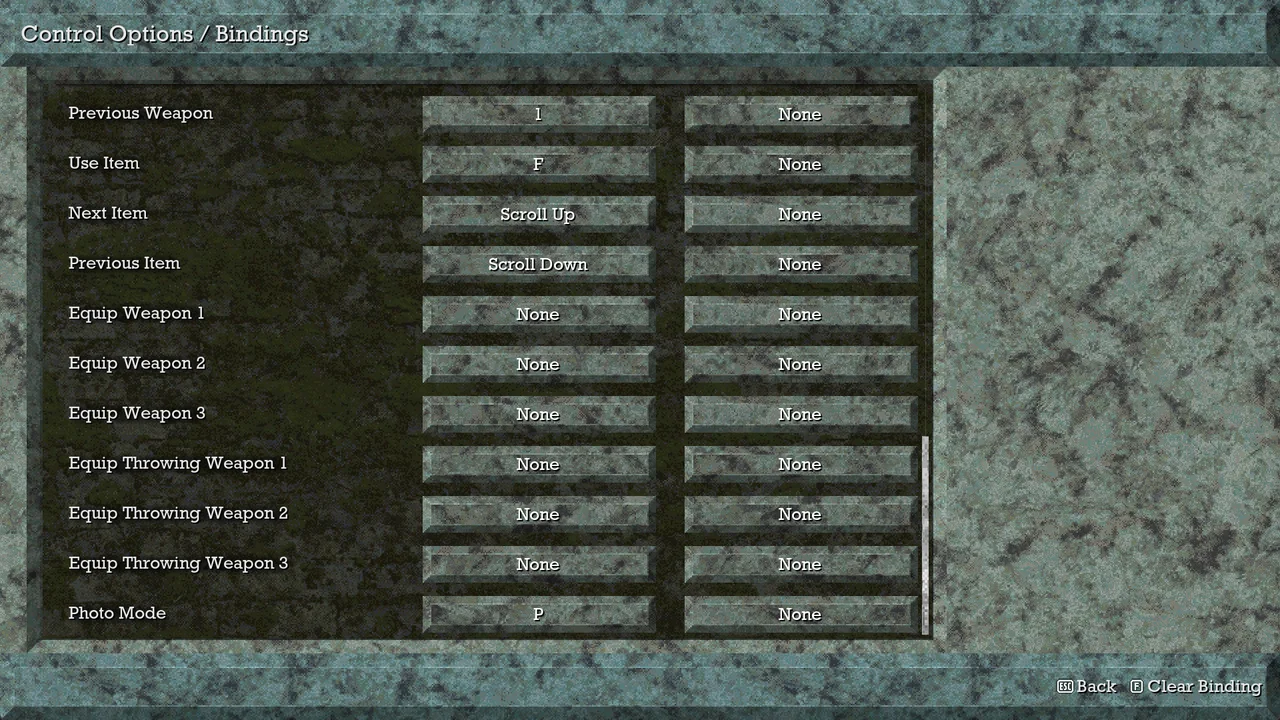
Default PC controls: WASD to move, Left Shift to run, mouse or arrow keys to look, left mouse for the primary attack (hold it to charge), right mouse for the secondary, R for the special, Left Ctrl for the wind dash, Q to throw, Space to jump, E to interact, F to use an item and Tab for Status & Inventory. Players report Look Acceleration is on by default; turn it off if the mouse feels floaty. Queen's Domain asks for very little: a quad-core Core i5 at 2.5 GHz, 4 GB of RAM, a GTX 760 or RX 560 and 1.5 GB of disk at minimum, Windows 10 and DirectX 11. It is Steam Deck and Steam Machine Verified, and patch 1.01.02 added a DX12 launch option.
Controls and options are read from Kingy's own PC copy on November 4, 2026 (Steam build 26356968, title screen 1.01.03, keyboard and mouse); we didn't test a controller. Specs and the Deck rating are the developer's. The 16:10 fix is a single player report from the Steam forum that we haven't tested.
1
Default controls: moving and looking
Keyboard and mouse bindings live under Options, Control Options, Keyboard / Mouse Bindings, Configure. Each action takes two keys. We didn't change any, so these are the defaults.
Hold the primary attack to charge it: in our session three quick slashes didn't break the first barricade, and one charged attack did. The wind dash has a mouse thumb button as its second key.
The direct equip keys for each weapon and throwing slot start unbound, so set them here if you swap weapons often. The pause menu's Photo Mode also has its own key.
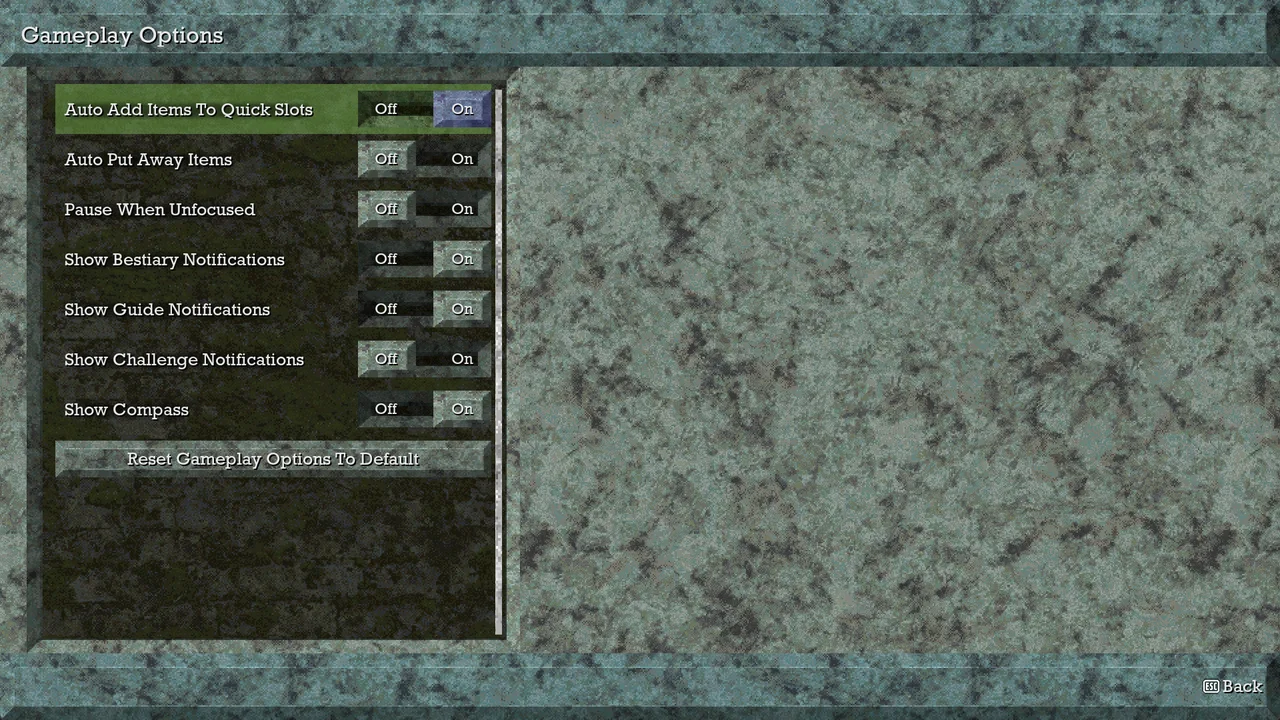
Gameplay Options has seven switches: Auto Add Items To Quick Slots, Auto Put Away Items, Pause When Unfocused, Show Bestiary Notifications, Show Guide Notifications, Show Challenge Notifications and Show Compass. Pause When Unfocused does what it says: turn it off if you record or stream with another window in front, as we did before recording (we did not capture its earlier value). There is no difficulty setting anywhere in Options.
The still shows our settings, not the defaults: Pause When Unfocused and Show Challenge Notifications were off when we took it.
Patch 1.01.04 (November 6 UTC) adds an option to turn off screenshake, which helps if the camera shake bothers you. With a d-pad or arrow keys, left and right now scroll a whole page at a time in long lists. The notes don't say which options menu holds the screenshake switch; Kingy hasn't checked it on the new build yet.
Valve rated it Verified for both on October 29, the day before launch. The developers say their testers played hundreds of hours on Deck during development.
Patch 1.01.02 (October 31) added a DirectX 12 launch option alongside the default DirectX 11. The notes do not say what it fixes; if the game stutters or will not start for you, it is the first thing to try. Patch 1.01.01 separately fixed a freeze when a weapon evolves and a Mimic freeze.
A 16:10 player found the game letterboxed until they set the aspect ratio to Auto; the game then fills the screen while the main menu and cutscenes stay 16:9. Nobody has reported on ultrawide yet.
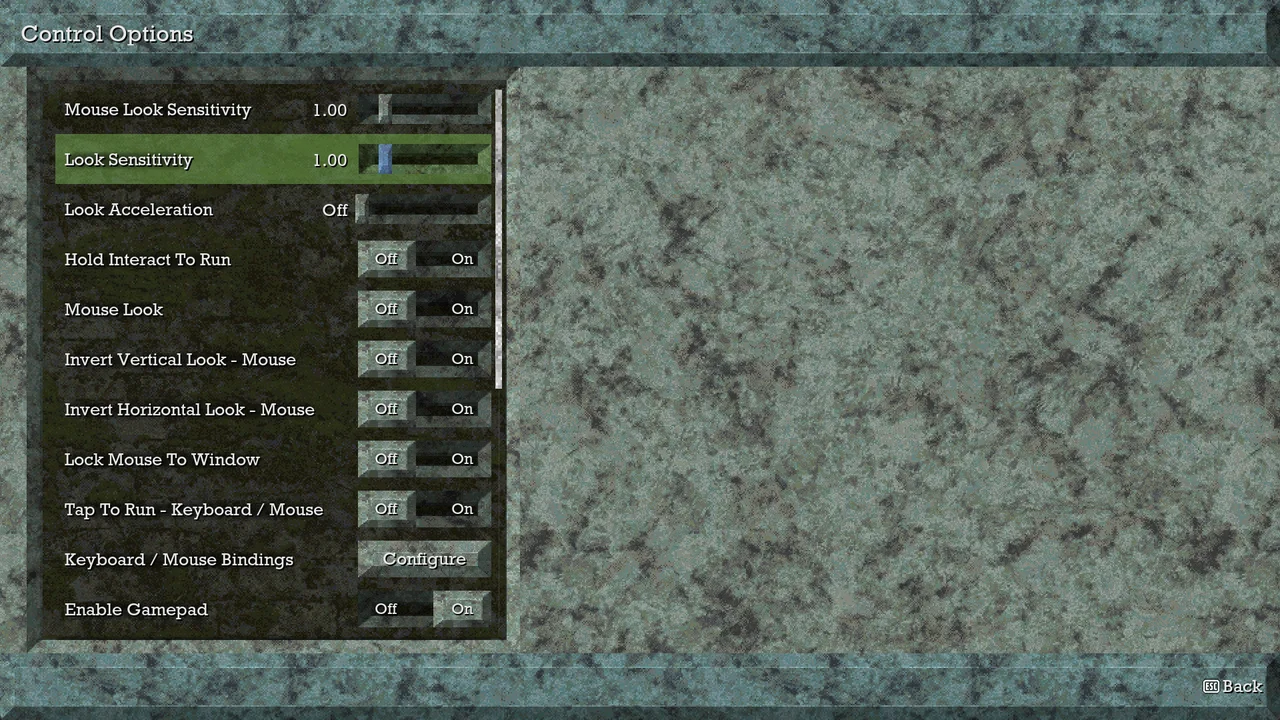
Under Options, Control Options there is a Look Acceleration setting, which players report is on by default (we turned it off and did not capture its earlier value). The player who asked about a weird mouse got the answer to turn it off, and it helped. The same screen has both sensitivity sliders (1.00 in our copy; we never moved them), Hold Interact To Run, Mouse Look, invert vertical and horizontal mouse look, Lock Mouse To Window, Tap To Run, the key bindings and Enable Gamepad.
With Mouse Look off you look around with the arrow keys only. The still shows our settings: we turned Look Acceleration and Mouse Look off for an arrow-key session.
Sources · 8Official · Walkthrough · Reported · checked 6 Nov 2026 · Research checked 6 Nov 2026
Queen's Domain on Steam ↗Read November 2. Release October 30, 2026. Developer Freshly Baked Games LLC, publisher Future Friends Games. Windows; Steam Cloud listed; a separate demo is listed.Official ·
Queen's Domain version 1.01.01 patch ↗Posted 04:13 UTC October 31 (October 30 in the Americas). Fixes a soft lock in Pit of Despair, a freeze when weapons evolve, the Executioner door getting stuck, a Mimic freeze, missing water return pits around Neasied, and Star Lizard bags stuck in mid-air.Official ·
Queen's Domain version 1.01.02 patch ↗Adds a dx12 launch option. Fixes Dagoom the Sea King dying while spinning, a few spots where you could get stuck, an accessory stat on loading a game, and the boss trigger for Black Skeletal Witch Husipo; ground wave hit boxes adjusted.Official ·
Queen's Domain version 1.01.04 patch ↗Posted 05:50 UTC November 6. Fixes getting stuck behind the statue at the queen's grave, a soft lock from resting several times in a row, water return points on moving objects, Steam Cloud saves not restoring after a crash on another device, the Herald of Okbujo's death animation, a stuck shopkeeper dialog and Dagoom's poison ring staying forever. Adds the Grave Knife throwing weapon, a screenshake toggle, options to ease some late-game puzzles, status effect icons and page-at-a-time list scrolling; corrects three challenge counts.Official ·
Kingy test run: Queen's Domain on PC, new game to the Ratty Bug ↗Kingy's own two sessions on Curtis's Steam copy, Windows 11, November 4, 2026 (PC local time): Steam build 26356968, title screen Version 1.01.03, windowed 1920x1080, keyboard and mouse, English. Covered the Options screens and all three pages of key bindings, a new game from the beach (no weapon, empty inventory), the Knight's Encampment, Commander Ekonta's dialogue and the Rusted Short Sword (Power 7, Slash, Average), equipping it from Status & Inventory, breaking the barricade with a charged attack after three quick slashes failed, the Knight's Encampment Crystal Monument (Save, Rest, Leave; Rest took life from 50 to 100), the Quit To Title never-saved warning, deep-water damage, and three deaths to the Ratty Bug on the plateau above the monument, each reloaded with Continue. Two more recordings later on November 4, 2026 (PC local time, same build): sprinting past the Ratty Bug (it followed us to the sea cliff and killed us), then two fights played with Kingy’s own screen-reading input helper (charged attacks with a step back): the first got its bar down to a sliver as we died in the same second (the Game Over reload undid it), the second killed it, unlocking its Bestiary entry (35 life, Attack Power 10, 26 EXP, weak to Slash, normal to Impact, resists Pierce) and leaving Total EXP 26, EXP to next 334, life 50/100. A clay pot near the monument broke with no visible drop. Not covered: anything past that plateau, the first weapons beyond the sword, a controller, Steam Deck and consoles. Silent clips and stills were recorded from the game window. We turned Look Acceleration and Mouse Look off in the first session and Pause When Unfocused off in the second; earlier values were not captured, and no binding was changed.Walkthrough ·
16:10 aspect ratio ↗Robehr: 16:10 works in game with the aspect ratio set to Auto; the main menu and cutscenes stay 16:9.Reported ·
Mouse feels really weird ↗Cacheohiza: a mouse acceleration setting called Look Acceleration is on by default under Control settings; turning it off helped.Reported ·
Stuck? Tell us where
Say where you’re stuck in Queen's Domain. You get one hint at a time from a published kingy.wiki guide, and the answer and its clip stay covered until you ask.
If nothing matches, we keep your words (without emails, links or long numbers) to decide which answers to write next. Privacy