Repair armor, weapons and tools at a Repair Station
Quick answer
For ordinary researched gear, the PC guides describe using a powered Repair Station with the damaged item and its required materials. Check the equipment’s own research unlock as well as the station. The Maintenance Journey also has vehicle and recycling tasks, so repairing one item does not establish that the whole Journey is complete. Xbox controls and current repair values have not yet been tested here.
“How to Repair Items in Dune: Awakening” by Quick Tips · Jun 10, 2025 · Uploaded June 10, 2025 (launch month); predates the 1.x patches through Hotfix 1.5.3.7
A damaged piece of ordinary equipment whose research you can inspect; unique or schematic-only items need separate verification.
Access to Repair Station research and construction, sufficient base power, and the repair materials shown by the installed game.
The interaction sequence below is reported from June 2025 PC guides. Use current prompts on Xbox; no button mapping or platform parity is claimed.
1
Vehicle durability setting fixed in 1.5.15.0
The October 12 support list says Max Durability Decay does not affect vehicle parts. The newer October 19 patch 1.5.15.0 explicitly reports fixing that vehicle-setting fault. Check your installed version and actual setting before using the older exception. The patch does not establish an armor repair rate or restore durability already lost.
Kingy’s success check is that the same item is back in your inventory with the expected repaired durability and the displayed materials consumed. Record that result rather than treating placement of the station as a completed repair. No exact material count, power budget or crafting duration is verified for the current build.
Find and research the Repair Station. PC launch guides place it in the Iron Products research group; the Maintenance Journey includes this research step.
Use the construction tool to place the station in your base, or inspect an accessible existing one. The current Maintenance data lists constructing or interacting with a station.
Check the station’s circuit-power requirement against the base supply before starting.
Interact with the station, insert the damaged equipment and read the materials requested for that item. Supply the displayed shortfall.
Older footage · checked Oct 13, 2026 · before Patches after launch (current build Hotfix 1.5.3.7)
On screen: The Repair Station interface: a list of the player’s damaged equipment, each with a durability bar, and a detail panel for the selected item showing the materials its repair requires. The player moves down the list selecting different items.
Check the guide’s version notes before following older footage.
“How to Repair Items in Dune: Awakening” by Quick Tips · Jun 10, 2025 · Uploaded June 10, 2025 (launch month); predates the 1.x patches through Hotfix 1.5.3.7
These are source-based checks, not a confirmed remedy for every disabled button. If all displayed requirements are met, retain the exact error, item name, research state, mode and build for a report. Do not assume that ordinary equipment rules cover unique items or consumable schematic licences.
Observed blocker
Next check
Station unavailable
Inspect its research unlock and current construction requirements.
Borrowed equipment will not repair
Both PC guides say you need the item’s research unlocked; possession alone is insufficient in their reported build.
Station has no power
Inspect circuit capacity and the generator supply.
Repair cannot start
Read missing-material and eligibility messages before buying more resources.
The community Maintenance page identifies version 1.5.3.3 and a September 22 update. Alongside the equipment task, it lists Welding Torch vehicle repair and Recycler objectives. Inspect the active Journey after repairing your item; this page does not claim the whole quest is finished or that completing it first is required to use the station. The data is a research lead, not an observed Xbox completion.
Game8’s June 2025 guide says repairing gear reduces its maximum durability. Compare current and maximum durability separately, and record the mode and custom settings before applying that old rule to a new save. This guide gives no universal decay percentage or number of repairs an item can survive.
Funcom’s October 12 known-issues list records the earlier Max Durability Decay vehicle-part fault; patch 1.5.15.0 reports fixing it on October 19. Neither source establishes an armor repair rate. Vehicles use welding-wire repair; use the vehicle guide for their safety and recovery limits. No current Xbox armor protection values, stillsuit bonuses or complete equipment list is established here.
Sources · 7Official · Reported · checked 19 Oct 2026 · Research checked 19 Oct 2026
Funcom: Dune Awakening patch 1.5.15.0 ↗Funcom announces patch 1.5.15.0 live on all platforms. Named base reconstruction, offline simulation, vehicle durability, Journey, controller and stability changes; no Kingy gameplay or recovery test.Official ·
How to repair in Dune: Awakening ↗PC launch repair procedure: Repair Station research, item research, ingredients and circuit power. Historical PC reporting; no current Xbox controls, station budget or durability behavior verified.Reported ·
How to Repair in Dune Awakening ↗Authored PC guide with credited screenshots: research/build the Repair Station, insert equipment and materials, and research borrowed equipment before repair. No current game build identified; exact input bindings and costs not imported.Reported ·
Maintenance Journey — Dune Awakening Database ↗Community data page labels version 1.5.3.3 and last update September 22, 2026. Lists researching, constructing or interacting with the Repair Station and repairing an item; vehicle repair and Recycler tasks are separate. Data listing is not a reproduced Xbox Journey.Reported ·
How to Repair Items ↗PC launch-era Repair Station and maximum-durability description. Does not establish current single-player settings, unique-item exceptions or per-repair loss values.Reported ·
Keeping Your Vehicle Safe ↗Support guidance for storm shelter, Vehicle Backup Tool storage, welding-wire repair and module disassembly. F is a PC key; exact Xbox input and outcomes were not tested.Official ·
Dune: Awakening known issues · updated October 12 ↗October 12 support update: spawning beneath terrain after a cinematic or death has an exit/wait at least five minutes/reconnect workaround; affected platform and build are unspecified. Previously sourced Xbox 2V2, Ultimate Edition, relocation, cross-device settings, microphone, wrong-destination Unstuck and named quest warnings remain separate. Support advice is not a Kingy gameplay test or proof of recovery.Official ·
Stuck? Tell us where
Say where you’re stuck in Dune: Awakening. You get one hint at a time from a published kingy.wiki guide, and the answer and its clip stay covered until you ask.
If nothing matches, we keep your words (without emails, links or long numbers) to decide which answers to write next. Privacy

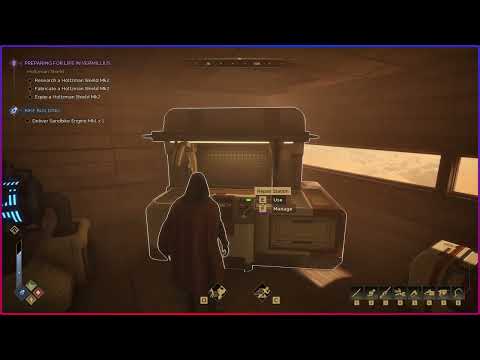 0:29–0:59 · 30 sThe Repair Station screen: damaged gear, durability and the materials a repair needs